Retrieve Perplexity AI data within your n8n workflows.
Incorporates Perplexity AI into n8n workflows to enhance querying functionalities.
How it works
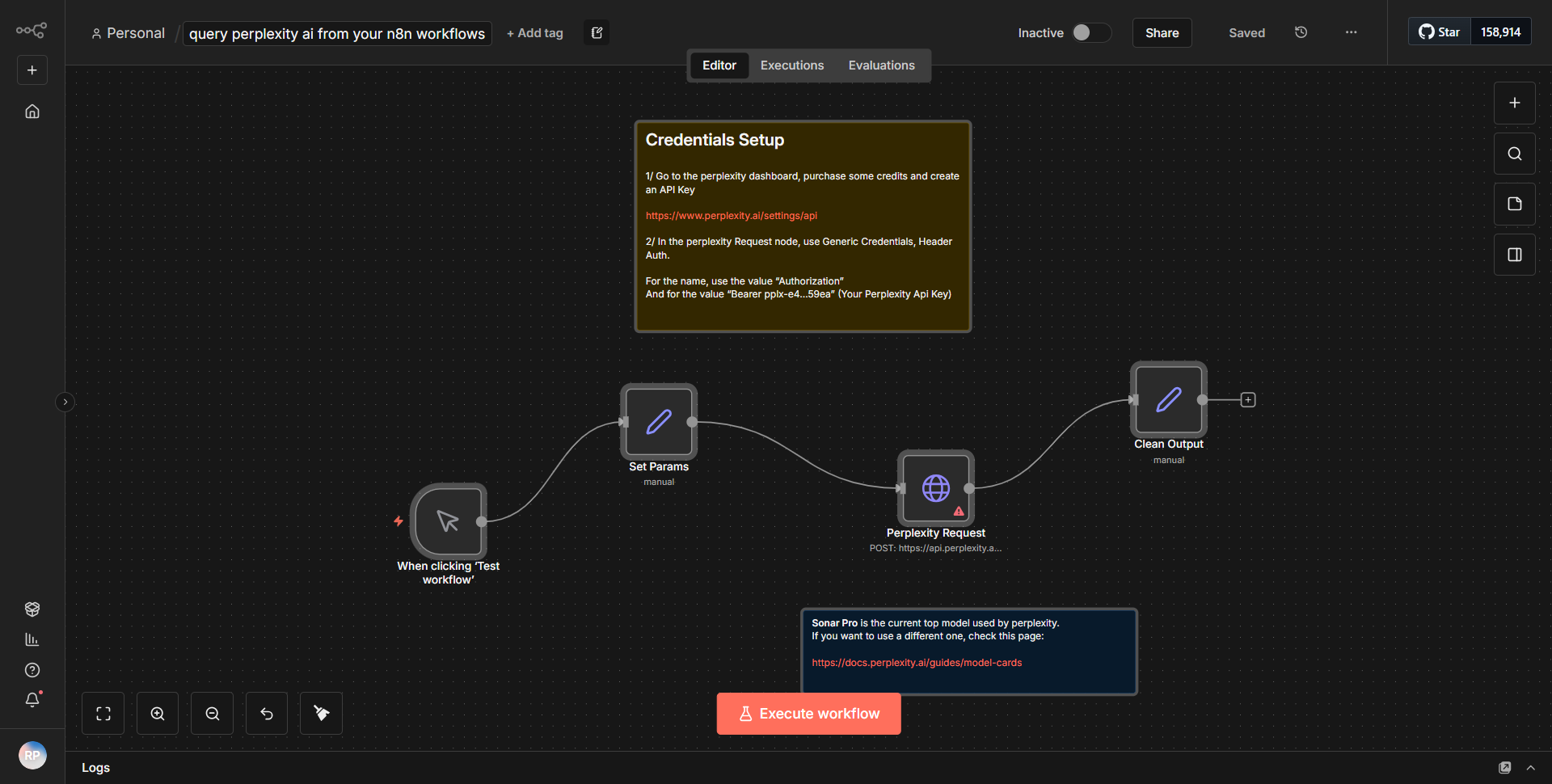
The workflow titled "Retrieve Perplexity AI data within your n8n workflows" is designed to integrate Perplexity AI into n8n, allowing users to enhance their querying capabilities. The workflow begins with a Trigger node, which initiates the process based on a specified event. This could be a manual trigger or an automated one based on incoming data.
Once triggered, the workflow proceeds to the HTTP Request node, which is configured to send a request to the Perplexity AI API. This node is crucial as it facilitates communication with the AI service, allowing the user to send queries and receive responses. The configuration of this node includes the necessary endpoint URL, HTTP method (typically POST), and any required headers, such as content type and authorization tokens.
After the HTTP Request node processes the query, the response from the Perplexity AI API is captured. This response is then passed to a subsequent node, which is likely a Function node or a Set node, where the data can be manipulated or formatted as needed. This step is essential for preparing the data for further use, such as sending it to another service or displaying it in a user-friendly format.
Finally, the workflow may include additional nodes for output, such as sending the processed data to an email, a database, or another external service. Each node is connected in a linear fashion, ensuring that the output from one node seamlessly becomes the input for the next, creating a cohesive flow of data.
Key Features
1. Integration with Perplexity AI:
This workflow allows users to leverage the capabilities of Perplexity AI directly within their n8n environment, enhancing the ability to query complex data sets and retrieve intelligent responses.
2. Customizable Queries:
Users can customize the queries sent to the Perplexity AI API, tailoring the requests to meet specific needs or use cases, which increases the flexibility of the workflow.
3. Data Manipulation:
The inclusion of nodes for data manipulation enables users to format and process the AI responses, making it easier to integrate the output into other applications or services.
4. Automated Triggers:
The workflow can be set to trigger automatically based on various events, allowing for real-time data retrieval and processing without manual intervention.
5. Seamless Data Flow:
The structured connection between nodes ensures a smooth flow of data, minimizing the risk of errors and enhancing the overall efficiency of the workflow.
Tools Integration
The workflow integrates the following tools and services:
- Perplexity AI:
The primary service utilized for querying and retrieving data.
- n8n HTTP Request Node:
This node is responsible for making API calls to the Perplexity AI service.
- Function Node / Set Node:
These nodes are used for processing and manipulating the data received from the API before it is sent to the final output.
API Keys Required
To successfully operate this workflow, an API key for Perplexity AI is required. This key must be included in the HTTP Request node's configuration to authenticate requests. Users should ensure they have the correct credentials and any additional configuration settings as specified by the Perplexity AI documentation. If no API keys are required for other nodes, it should be noted that only the Perplexity AI integration necessitates authentication.