Engage with GitHub API Documentation: RAG-Enhanced Chatbot Utilizing Pinecone & OpenAI
Develops a chatbot utilizing RAG to engage with the GitHub API documentation through Pinecone and OpenAI.
How it works
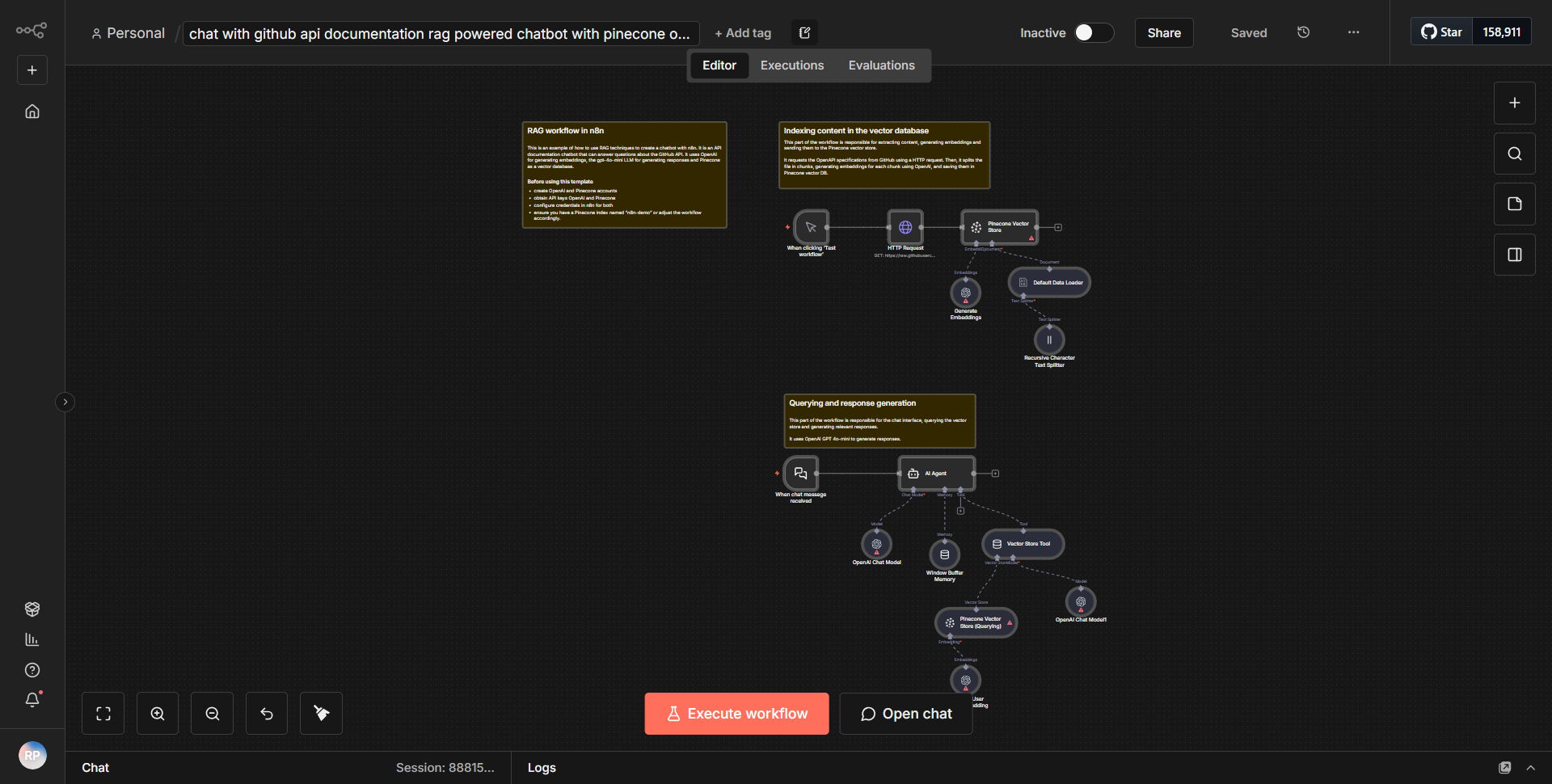
The workflow titled "Engage with GitHub API Documentation: RAG-Enhanced Chatbot Utilizing Pinecone & OpenAI" is designed to create an interactive chatbot that leverages the GitHub API documentation. The workflow operates through a series of interconnected nodes that facilitate data retrieval, processing, and response generation.
1. Trigger Node:
The workflow begins with a trigger node that activates the process when a user sends a query through the chatbot interface.
2. Pinecone Node:
The first operational node interacts with Pinecone, a vector database, to retrieve relevant documentation based on the user’s input. This node queries the Pinecone database to find contextually similar documents related to the GitHub API.
3. OpenAI Node:
After retrieving the relevant documents, the workflow proceeds to an OpenAI node. This node utilizes the OpenAI API to generate a response based on the retrieved documentation. The input to this node includes both the user’s query and the context from the GitHub API documentation.
4. Response Node:
Finally, the generated response from OpenAI is sent back to the user through a response node, completing the interaction.
Throughout this process, data flows seamlessly from the trigger to Pinecone, then to OpenAI, and back to the user, ensuring a smooth conversational experience.
Key Features
- RAG (Retrieval-Augmented Generation):
This workflow employs a RAG approach, enhancing the chatbot’s ability to provide accurate and contextually relevant answers by combining retrieval of documentation with generative responses.
- Integration with Pinecone:
The use of Pinecone allows for efficient storage and retrieval of vectorized documentation, improving the speed and accuracy of responses.
- OpenAI Integration:
By leveraging OpenAI’s capabilities, the chatbot can generate human-like responses, making interactions more engaging and informative.
- User-Friendly Interaction:
The workflow is designed to facilitate a natural conversation flow, allowing users to ask questions and receive detailed answers about the GitHub API documentation.
- Scalability:
The architecture of the workflow supports scalability, making it suitable for handling multiple user queries simultaneously without degradation in performance.
Tools Integration
The workflow utilizes the following tools and integrations:
- Pinecone:
A vector database used for storing and retrieving documentation vectors.
- OpenAI:
An AI service that generates responses based on the input provided, utilizing advanced natural language processing capabilities.
- n8n Nodes:
• Trigger Node: Initiates the workflow upon user interaction.
• Pinecone Node: Queries the Pinecone database for relevant documentation.
• OpenAI Node: Sends the user query and retrieved context to OpenAI for response generation.
• Response Node: Delivers the generated response back to the user.
API Keys Required
To successfully operate this workflow, the following API keys and credentials are necessary:
- Pinecone API Key:
Required for authenticating requests to the Pinecone database.
- OpenAI API Key:
Needed for accessing OpenAI’s services to generate responses.
No additional API keys or credentials are required beyond those mentioned above.