Create a Custom Image Search with AI Object Recognition, CDN, and ElasticSearch
Creates an image search engine utilizing AI object recognition, CDN, and Elasticsearch to facilitate efficient image retrieval.
How it works
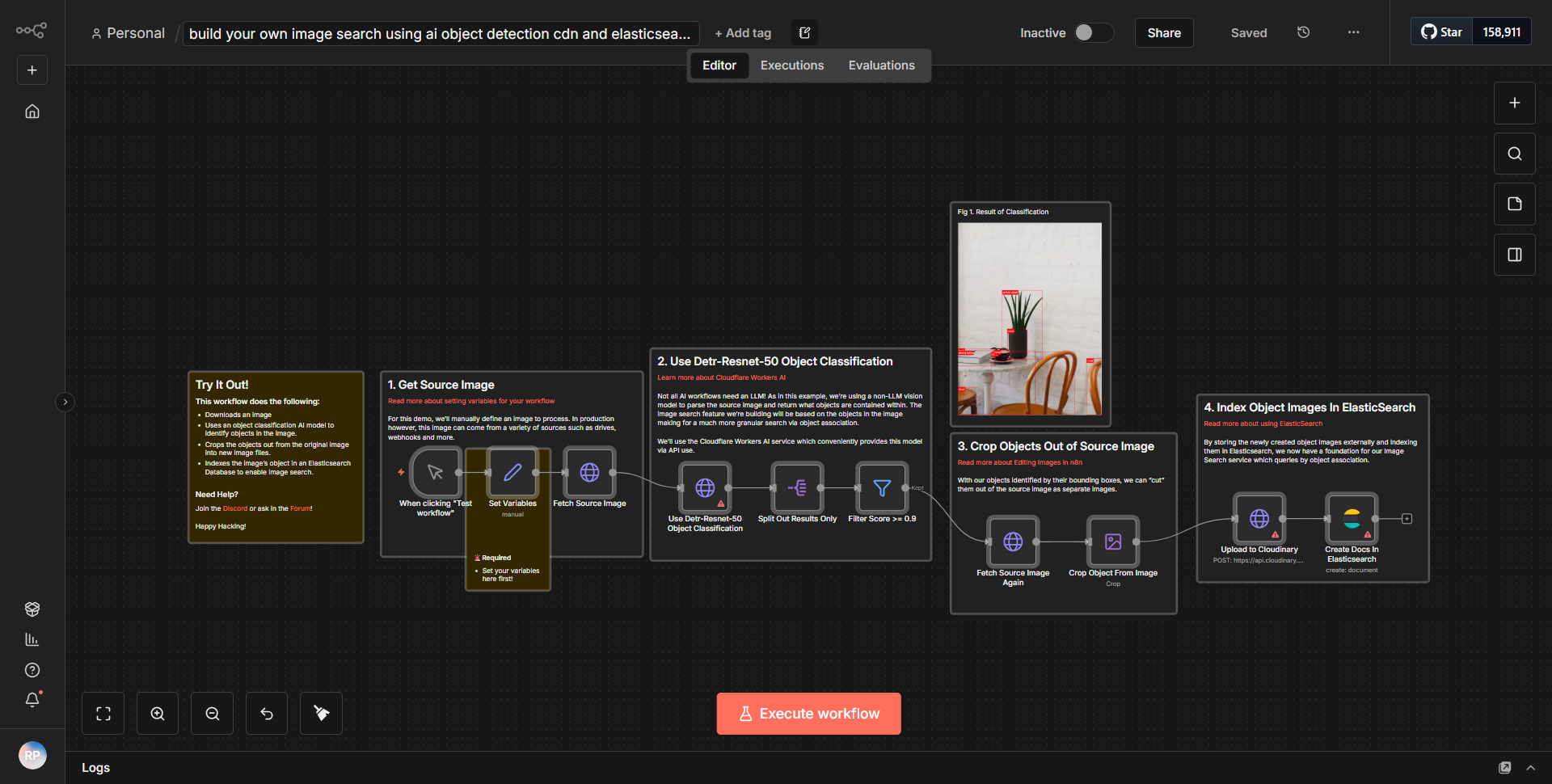
The workflow titled "Create a Custom Image Search with AI Object Recognition, CDN, and ElasticSearch" is designed to create an efficient image search engine. It utilizes a series of interconnected nodes to process images, recognize objects, and store metadata for easy retrieval.
1. Trigger Node:
The workflow begins with a trigger node that initiates the process when a new image is uploaded. This could be through a webhook or a manual trigger, depending on the configuration.
2. Image Processing Node:
Once triggered, the image is sent to an AI object recognition service. This node analyzes the image to identify objects within it, generating metadata that describes the contents of the image.
3. Data Formatting Node:
After object recognition, the metadata is formatted appropriately for storage. This node ensures that the data structure aligns with the requirements of the next steps in the workflow.
4. CDN Upload Node:
The processed image, along with its metadata, is then uploaded to a Content Delivery Network (CDN). This step optimizes image delivery and ensures that the images are accessible from multiple locations.
5. ElasticSearch Node:
Following the CDN upload, the metadata is sent to an Elasticsearch node. This node indexes the data, allowing for fast and efficient searching capabilities. The structured data enables users to perform complex queries on the image metadata.
6. Response Node:
Finally, the workflow concludes with a response node that returns the results of the search or confirms the successful upload and indexing of the image.
Throughout this process, data flows seamlessly from one node to the next, ensuring that images are processed, stored, and made searchable in an efficient manner.
Key Features
- AI Object Recognition:
The workflow integrates advanced AI technology to automatically identify and categorize objects within images, enhancing the searchability of visual content.
- CDN Integration:
By utilizing a Content Delivery Network, the workflow ensures that images are delivered quickly and reliably to users, improving the overall user experience.
- ElasticSearch Indexing:
The use of Elasticsearch allows for powerful search capabilities, enabling users to find images based on specific criteria and metadata.
- Automated Workflow:
The entire process from image upload to indexing is automated, reducing manual effort and increasing efficiency.
- Scalability:
The architecture supports scalability, allowing for the addition of more images and metadata without compromising performance.
Tools Integration
- AI Object Recognition Service:
This node processes images to detect and classify objects.
- CDN Node:
This node handles the uploading of images to a Content Delivery Network for optimized delivery.
- ElasticSearch Node:
This node is responsible for indexing the image metadata, enabling efficient search capabilities.
- Trigger Node:
Initiates the workflow based on specific events, such as image uploads.
API Keys Required
• API keys for the AI object recognition service are required to authenticate requests and enable image processing.
• API keys for the CDN service are necessary for uploading images and managing content delivery.
• API keys for the Elasticsearch service are needed to index and query the image metadata.
No additional API keys or credentials are required beyond those mentioned above for the workflow to function correctly.