Seamless End-to-End Optimization of OpenAI Models with Google Drive Connectivity
Facilitates the optimization of OpenAI models through integration with Google Drive for data management, enhancing the efficiency of tailored AI model training.
How it works
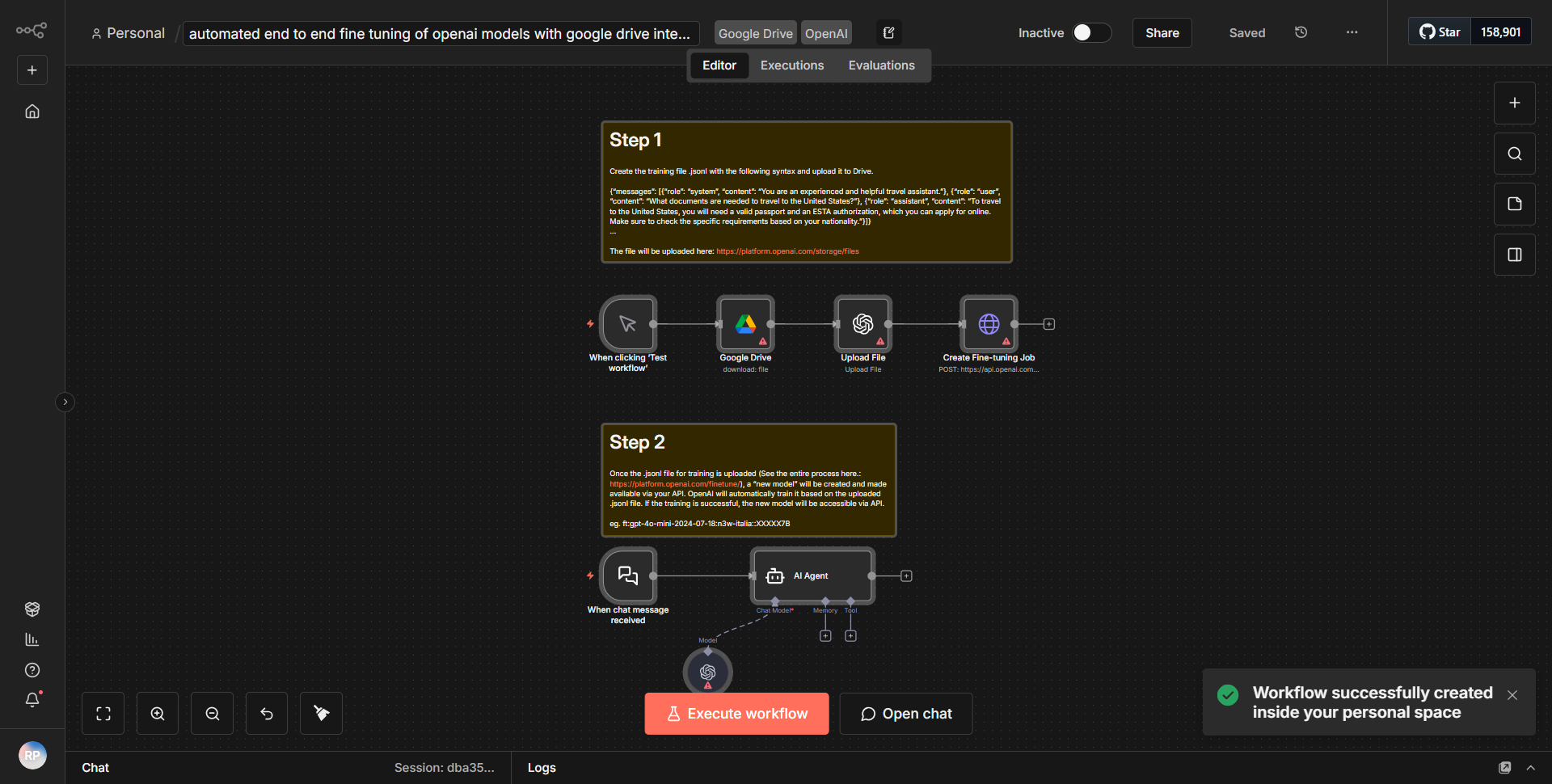
The workflow titled "Seamless End-to-End Optimization of OpenAI Models with Google Drive Connectivity" is designed to streamline the process of optimizing OpenAI models by leveraging Google Drive for efficient data management. The workflow operates through a series of interconnected nodes that facilitate data retrieval, processing, and model training.
1. Trigger Node:
The workflow begins with a trigger node that initiates the process based on a specified event, such as a new file upload to a designated Google Drive folder.
2. Google Drive Node:
Once triggered, the workflow utilizes the Google Drive node to access the uploaded data. This node is configured to search for specific files or folders that contain the training data necessary for optimizing the OpenAI models.
3. Data Processing Node:
After retrieving the data, the workflow employs a data processing node to format and preprocess the data as required by the OpenAI model. This may include cleaning the data, transforming it into the appropriate structure, or performing any necessary calculations.
4. OpenAI Node:
Following data preparation, the workflow integrates with the OpenAI node, where the actual model training takes place. This node is responsible for sending the processed data to the OpenAI API, initiating the fine-tuning of the model based on the provided dataset.
5. Feedback Loop:
Once the model training is completed, the workflow may include a feedback loop that allows for monitoring the performance of the model. This could involve sending the results back to Google Drive or notifying the user through another communication channel.
6. Completion Node:
Finally, the workflow concludes with a completion node that signifies the end of the process, ensuring that all operations have been executed successfully and that any necessary follow-up actions are taken.
Key Features
- Automated Data Management:
The integration with Google Drive allows for seamless data retrieval and storage, eliminating manual data handling and reducing the risk of errors.
- End-to-End Optimization:
The workflow automates the entire process from data upload to model training, ensuring a streamlined approach to optimizing OpenAI models.
- Customizable Triggers:
Users can set specific triggers based on their needs, allowing for flexibility in how and when the workflow is initiated.
- Real-time Feedback:
The inclusion of a feedback loop enables users to monitor model performance and make adjustments as necessary, enhancing the overall effectiveness of the training process.
- Scalability:
The workflow can be easily scaled to accommodate larger datasets or additional OpenAI models, making it suitable for various applications.
Tools Integration
- Google Drive Node:
Used for accessing and managing files stored in Google Drive.
- OpenAI Node:
Utilized for interacting with the OpenAI API to perform model training and optimization.
- Data Processing Node:
A custom node for preparing and transforming data before it is sent to the OpenAI model.
API Keys Required
- Google Drive API Key:
Required for accessing and managing files within Google Drive.
- OpenAI API Key:
Necessary for authenticating requests to the OpenAI API for model training.
No additional API keys or credentials are needed beyond those specified for Google Drive and OpenAI.