Post to Instagram and TikTok from Google Drive
Facilitates the direct transfer of media from Google Drive to Instagram and TikTok, enhancing the efficiency of social media content distribution.
How it works
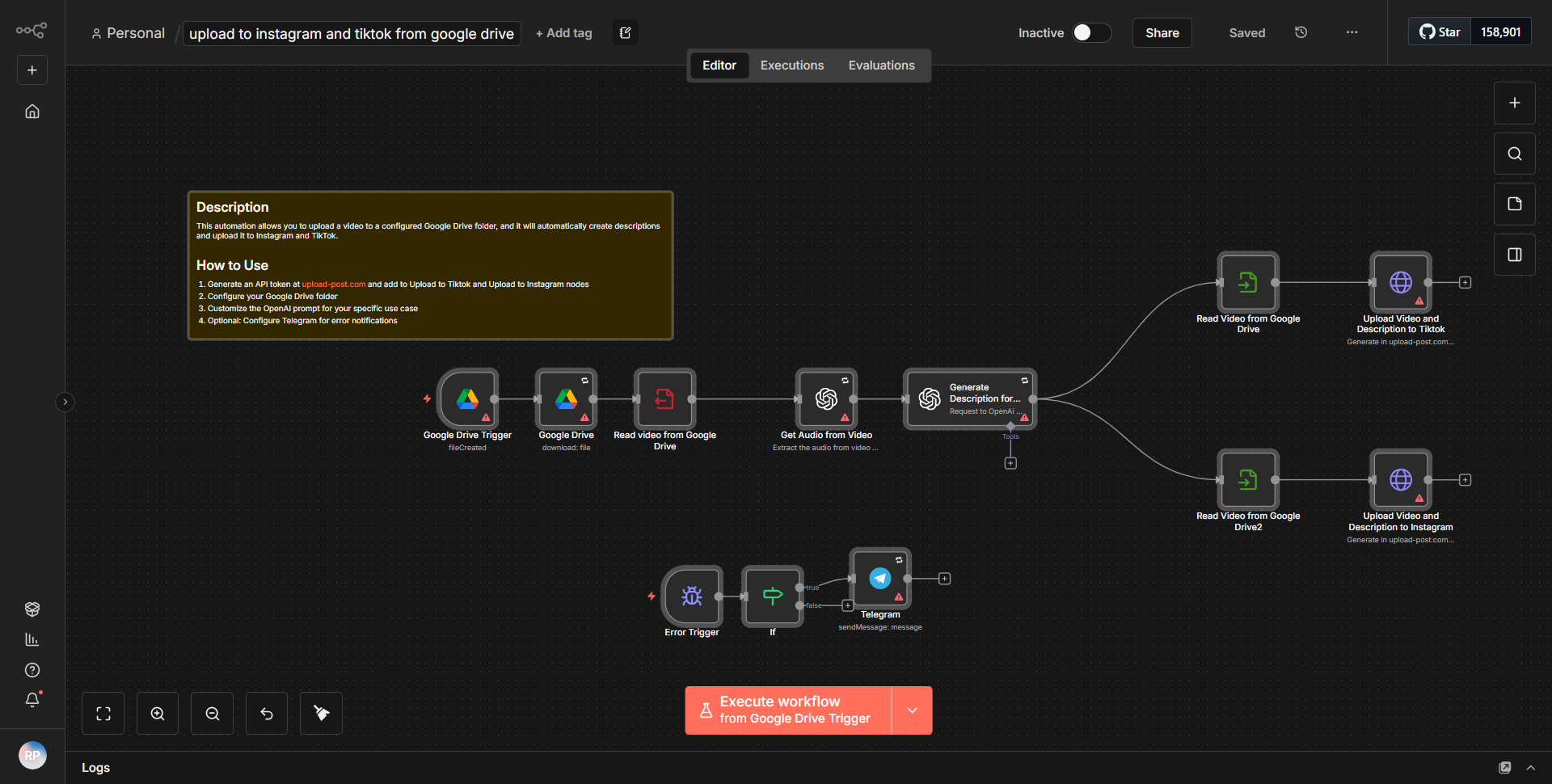
The workflow titled "Post to Instagram and TikTok from Google Drive" is designed to streamline the process of transferring media files from Google Drive directly to social media platforms Instagram and TikTok. The workflow operates through a series of interconnected nodes that facilitate data flow and execution of tasks.
1. Google Drive Node:
The workflow begins with a Google Drive node configured to trigger when a new file is added to a specified folder. This node monitors the designated folder for any new media files, such as images or videos.
2. IF Node:
Following the Google Drive node, an IF node is employed to determine the type of file that has been uploaded. This node checks the file extension to differentiate between image and video formats, allowing the workflow to handle each type appropriately.
3. Instagram Node:
If the uploaded file is an image, the workflow proceeds to an Instagram node. This node is configured to upload the image to a specified Instagram account. The node requires parameters such as the image URL and a caption to accompany the post.
4. TikTok Node:
In parallel, if the uploaded file is a video, the workflow routes to a TikTok node. Similar to the Instagram node, this node is set up to upload the video to a specified TikTok account, requiring the video URL and any relevant description or hashtags.
5. Execution and Completion:
Once the media files are uploaded to their respective platforms, the workflow concludes, ensuring that the content is shared efficiently across both social media channels without manual intervention.
Key Features
- Automated Media Transfer:
The workflow automates the process of transferring media files from Google Drive to Instagram and TikTok, saving time and reducing the need for manual uploads.
- File Type Handling:
With the use of an IF node, the workflow intelligently distinguishes between image and video files, ensuring that each file type is processed correctly and sent to the appropriate social media platform.
- Multi-Platform Posting:
The ability to post simultaneously to both Instagram and TikTok enhances the efficiency of social media management, allowing users to reach audiences across different platforms with minimal effort.
- Customizable Parameters:
Users can customize captions and descriptions for each post, allowing for tailored messaging that aligns with their branding and marketing strategies.
Tools Integration
- Google Drive:
Utilized for storing and retrieving media files. The Google Drive node is responsible for monitoring the folder for new uploads.
- Instagram:
Integrated through the Instagram node, which facilitates the uploading of images to a specified account.
- TikTok:
Integrated via the TikTok node, which allows for the uploading of videos to a designated TikTok account.
API Keys Required
- Google Drive API Key:
Required for accessing and monitoring the Google Drive folder.
- Instagram API Key:
Necessary for authenticating and posting images to the Instagram account.
- TikTok API Key:
Required for authenticating and uploading videos to the TikTok account.
This workflow requires valid API keys for each of the services to function correctly, ensuring secure and authorized access to the respective platforms.