Assess new prospects in Google Sheets using OpenAI's GPT-4.
Employs OpenAI's GPT-4 to evaluate and classify new leads added to a Google Sheet, assisting sales teams in prioritizing their contact efforts.
How it works
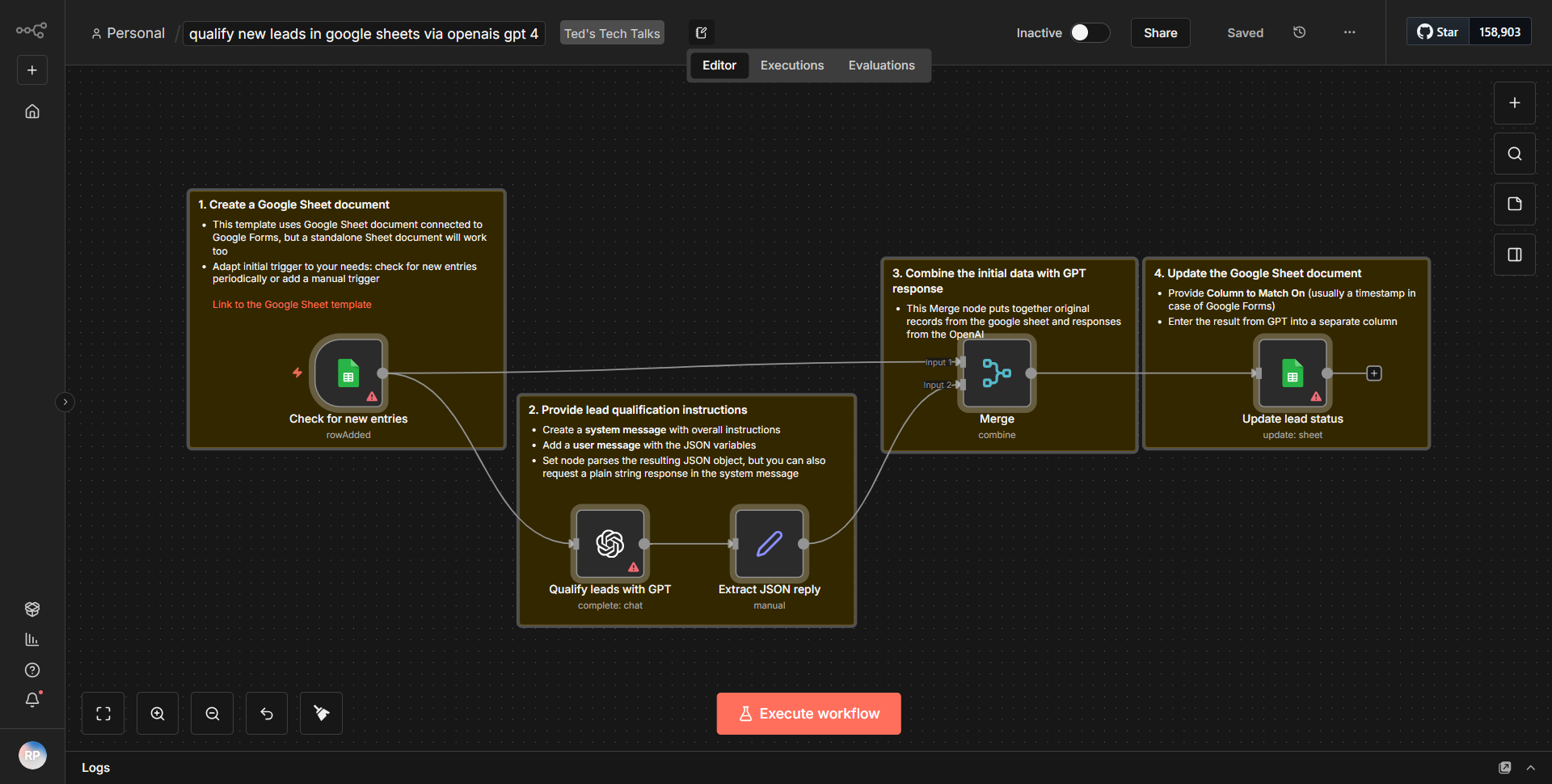
The workflow begins by monitoring a Google Sheet for new rows added, specifically targeting a sheet where new leads are recorded. This is achieved using the Google Sheets node configured to trigger on new rows. Once a new lead is detected, the workflow extracts relevant data from the row, such as the lead's name, email, and any other pertinent information.
Next, the workflow utilizes the OpenAI node to send this extracted data to OpenAI's GPT-4 model. The input is structured to prompt the model to evaluate the lead based on the provided information. The model processes the input and generates a classification or evaluation of the lead, which is then returned to the workflow.
Following the response from GPT-4, the workflow includes a conditional node that checks the classification result. Based on the outcome, the workflow can take different actions, such as updating the Google Sheet with the evaluation or sending a notification to the sales team. This ensures that the sales team can prioritize their outreach efforts based on the quality of the leads evaluated by the AI.
Key Features
1. Automated Lead Evaluation:
The workflow automates the process of evaluating new leads, saving time for sales teams by providing instant feedback on lead quality.
2. Integration with OpenAI's GPT-4:
By leveraging the advanced capabilities of GPT-4, the workflow can deliver nuanced evaluations that consider various factors in the lead data.
3. Real-time Updates:
As new leads are added to the Google Sheet, the workflow processes them in real-time, ensuring that the sales team always has the latest information.
4. Customizable Actions Based on Evaluation:
The workflow allows for different actions based on the AI's evaluation, enabling tailored responses to lead classifications.
5. User-Friendly Interface:
The integration with Google Sheets provides a familiar interface for users, making it easy to manage leads and view evaluations.
Tools Integration
- Google Sheets:
Used to store and manage lead data. The Google Sheets node is configured to trigger on new rows.
- OpenAI:
Utilized for lead evaluation through the GPT-4 model. The OpenAI node is responsible for sending data to and receiving responses from the AI.
- n8n Workflow Nodes:
Includes nodes for Google Sheets (to monitor and update data) and OpenAI (to process lead evaluations).
API Keys Required
- OpenAI API Key:
Required to authenticate and access the GPT-4 model for lead evaluation.
- Google Sheets API Credentials:
Necessary to allow the workflow to read from and write to the specified Google Sheet.
No additional API keys or credentials are mentioned as required for the operation of this workflow.