Save Notion Pages as Vector Files in Supabase Using OpenAI
Streamlines the process of saving Notion pages as vector documents within a Supabase database, utilizing OpenAI to create embeddings for the content.
How it works
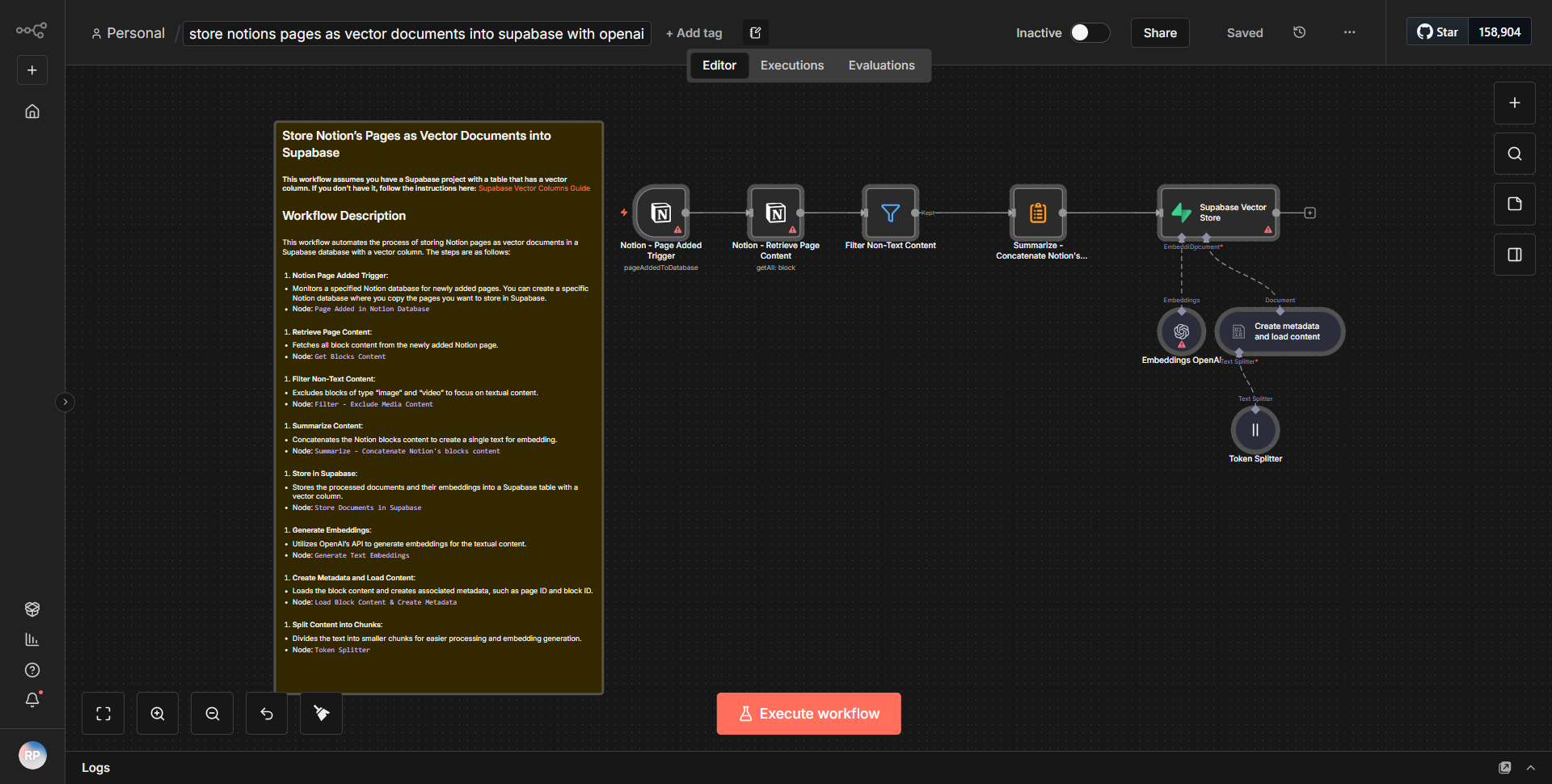
The workflow titled "Save Notion Pages as Vector Files in Supabase Using OpenAI" is designed to automate the process of saving content from Notion pages into a Supabase database as vector documents. The workflow operates through a series of interconnected nodes, each performing a specific function to facilitate the data flow.
1. Notion Node:
The workflow begins with a Notion node that retrieves the content of a specified Notion page. This node is configured to connect to the Notion API, requiring appropriate authentication to access the desired page.
2. OpenAI Node:
After fetching the content from Notion, the workflow passes this data to an OpenAI node. This node utilizes the OpenAI API to generate embeddings for the content. The embeddings are vector representations that capture the semantic meaning of the text, making it suitable for storage and further processing.
3. Function Node:
Following the OpenAI node, a Function node processes the embeddings generated by OpenAI. This node formats the data appropriately, preparing it for insertion into the Supabase database. It ensures that the structure of the data aligns with the requirements of the database schema.
4. Supabase Node:
Finally, the workflow concludes with a Supabase node that inserts the formatted data into the Supabase database. This node is responsible for creating a new record in the specified table, effectively saving the Notion page content as a vector document.
Throughout this process, the workflow maintains a seamless flow of data from Notion to OpenAI and finally to Supabase, ensuring that each step is executed in the correct sequence.
Key Features
- Automated Data Retrieval:
The workflow automates the retrieval of content from Notion, eliminating the need for manual copying and pasting.
- Vector Embedding Generation:
By utilizing OpenAI, the workflow generates vector embeddings that encapsulate the meaning of the text, enabling advanced data analysis and retrieval.
- Database Integration:
The seamless integration with Supabase allows for efficient storage of vector documents, making them easily accessible for future queries and analyses.
- Custom Data Processing:
The inclusion of a Function node allows for custom processing of the data, ensuring that it meets the specific requirements of the Supabase database schema.
- Scalability:
This workflow can be easily scaled to handle multiple Notion pages, making it suitable for larger projects or organizations that require extensive documentation management.
Tools Integration
- Notion:
Utilized for retrieving content from Notion pages via its API.
- OpenAI:
Employed for generating vector embeddings from the retrieved text content.
- Supabase:
Used for storing the vector documents in a database, allowing for structured data management.
- n8n Nodes:
• Notion node for data retrieval.
• OpenAI node for embedding generation.
• Function node for data processing.
• Supabase node for data insertion.
API Keys Required
- Notion API Key:
Required for authenticating and accessing Notion pages.
- OpenAI API Key:
Necessary for generating embeddings through the OpenAI API.
- Supabase API Key:
Needed for connecting to the Supabase database and performing data insertion.
No additional API keys or authentication credentials are required beyond those specified for the services mentioned above.