Insert large documents into a vector database using Supabase and Notion.
Handles extensive documents by dividing them into segments, creating embeddings, and inserting them into a Supabase vector database, utilizing Notion as the source of the documents.
How it works
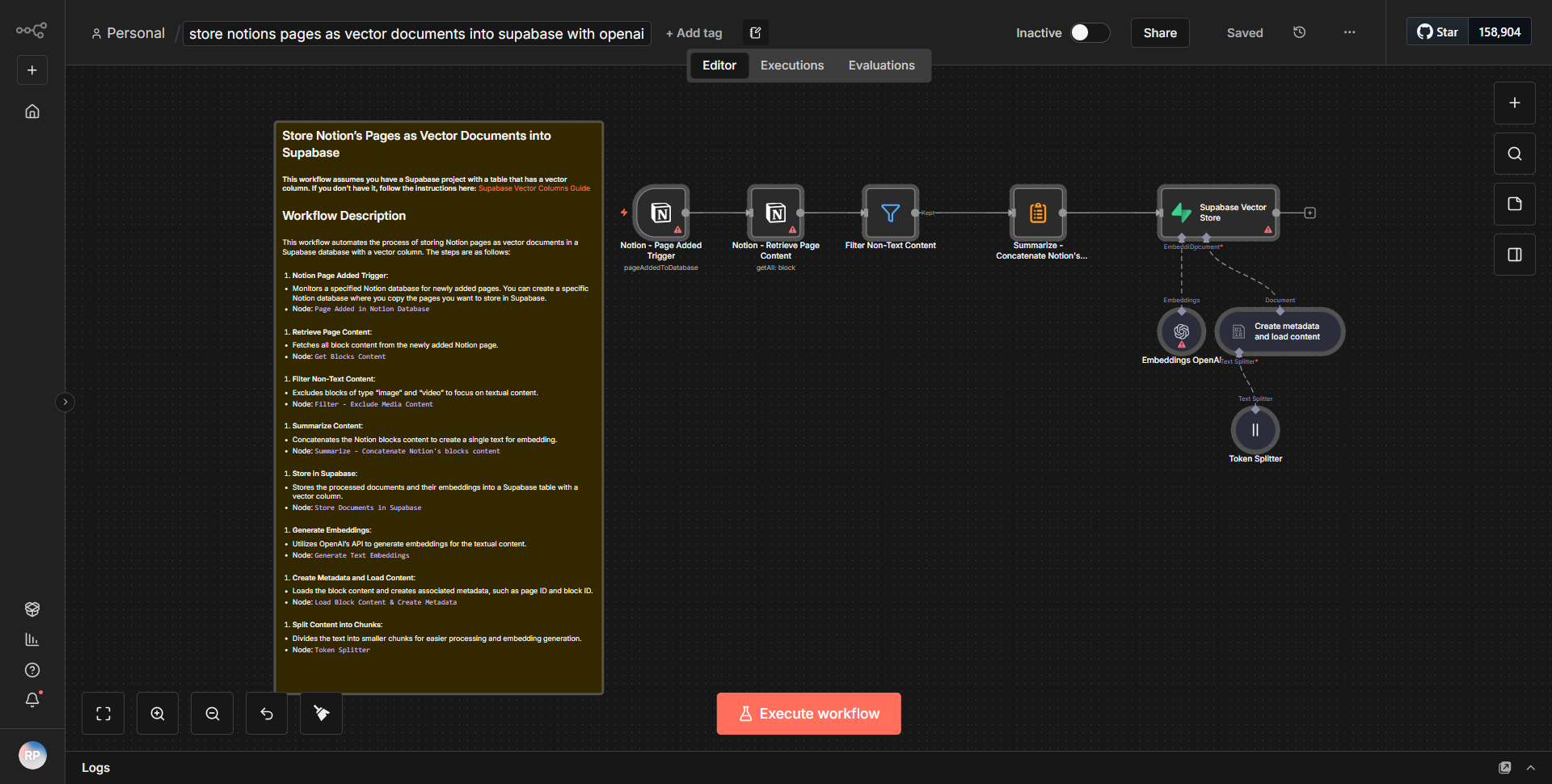
The workflow is designed to process large documents from Notion, segment them, create embeddings, and store these embeddings in a Supabase vector database. The workflow begins with a trigger node that retrieves documents from a specified Notion database. Once the documents are fetched, they are segmented into smaller parts to facilitate easier processing. Each segment is then passed to an embedding creation node, which generates vector representations of the text segments. These embeddings are crucial for later retrieval and similarity searches in the vector database.
After the embeddings are created, the workflow utilizes a Supabase node to insert the embeddings into a designated vector table within the Supabase database. This step ensures that the embeddings are stored in a format that allows for efficient querying and retrieval. The workflow concludes with a success message or notification, confirming that the embeddings have been successfully inserted into the database.
The connections between the nodes are linear, with each step dependent on the successful completion of the previous one. This structured approach ensures that large documents are effectively handled and stored in a way that optimizes their retrieval in future operations.
Key Features
1. Document Segmentation:
The workflow intelligently divides large documents into manageable segments, enabling efficient processing and embedding creation.
2. Embedding Generation:
It utilizes advanced algorithms to create vector embeddings from text segments, which are essential for similarity searches in vector databases.
3. Supabase Integration:
The workflow seamlessly integrates with Supabase, allowing for the storage of embeddings in a robust vector database.
4. Notion as a Source:
By using Notion as the document source, the workflow leverages a popular note-taking and project management tool, making it accessible for users already familiar with Notion.
5. Automated Process:
The entire workflow is automated, reducing manual intervention and streamlining the process of handling large documents.
Tools Integration
- Notion:
Used as the source of documents, allowing the workflow to fetch content directly from a Notion database.
- Supabase:
Acts as the vector database where embeddings are stored, providing a scalable solution for managing large datasets.
- n8n Nodes:
Specific nodes used in the workflow include:
• Notion node for fetching documents.
• Function node for segmenting documents.
• Embedding node for generating vector representations.
• Supabase node for inserting data into the database.
API Keys Required
To successfully execute this workflow, the following API keys and credentials are required:
- Notion API Key:
Needed to authenticate and access the Notion database.
- Supabase API Key:
Required for connecting and performing operations on the Supabase vector database.
- Supabase Project URL:
Necessary for establishing a connection to the specific Supabase project where the embeddings will be stored.