Incorporate affirmative feedback entries into a Notion table.
Collects positive responses from Typeform, evaluates sentiment using Google Cloud Natural Language, and inputs it into a Notion database, with Slack alerts for feedback that scores highly.
How it works
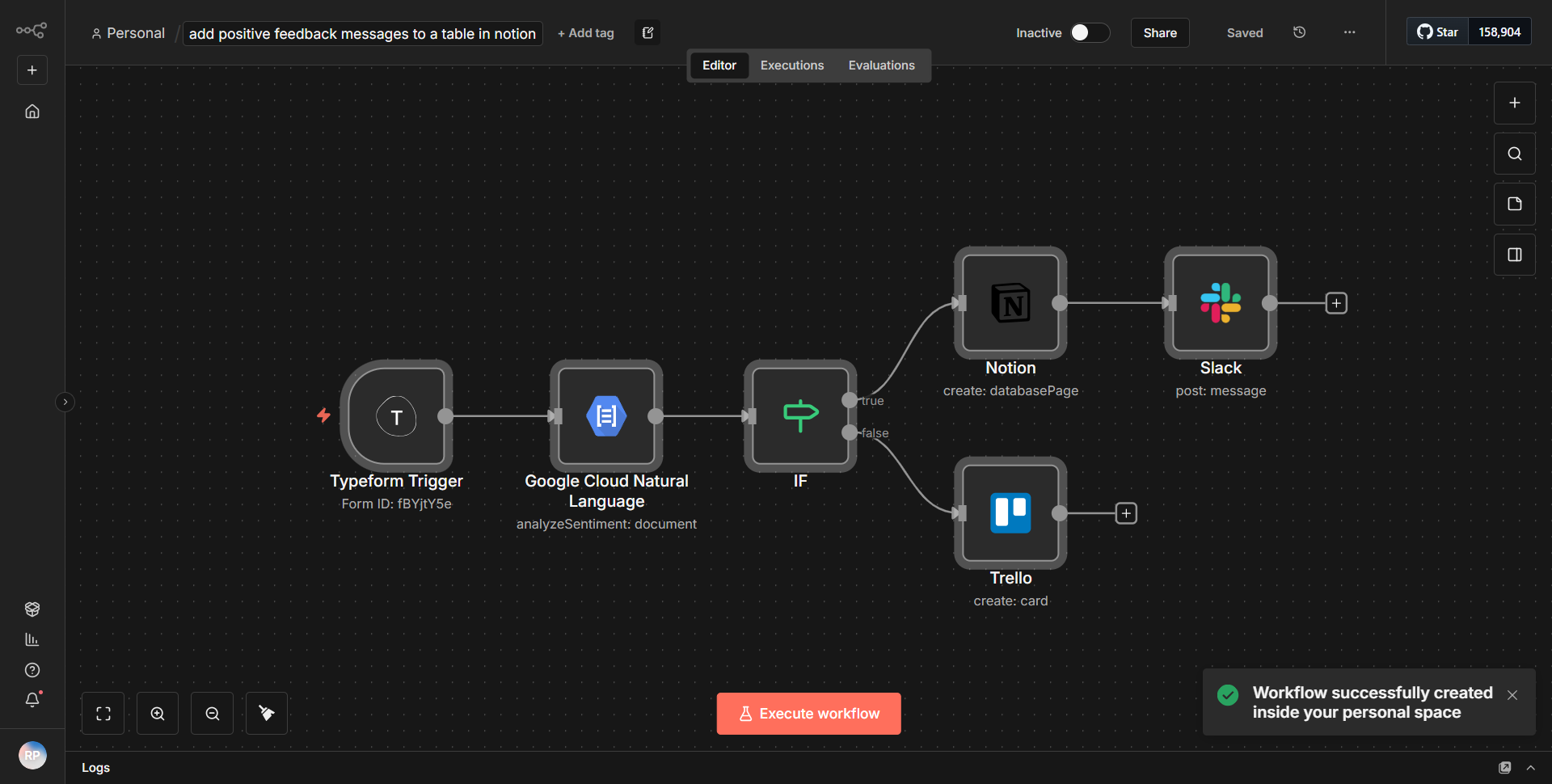
The workflow begins with a Typeform node that triggers when a new response is submitted. This node collects positive feedback entries from users. The data received from Typeform includes the user's responses, which are then passed to the next node for processing.
The second node is a Google Cloud Natural Language node, which analyzes the sentiment of the feedback. It evaluates the text to determine whether the sentiment is positive, negative, or neutral. The output of this node includes a sentiment score and magnitude, which are crucial for the subsequent steps.
Following the sentiment analysis, a conditional node checks if the sentiment score exceeds a predefined threshold, indicating a highly positive response. If the condition is met, the workflow proceeds to the next node; if not, the workflow ends without further action.
The next step involves a Notion node that inputs the positive feedback into a specified Notion database. This node is configured to map the relevant fields from the Typeform response to the corresponding columns in the Notion table, ensuring that all necessary information is recorded accurately.
Finally, if the feedback is deemed highly positive, a Slack node sends an alert to a designated Slack channel. This notification includes details about the feedback, allowing team members to recognize and respond to positive sentiments in real-time.
Key Features
1. Automated Feedback Collection:
The workflow automates the collection of positive feedback from Typeform, reducing manual effort and ensuring timely data processing.
2. Sentiment Analysis:
By integrating Google Cloud Natural Language, the workflow evaluates the sentiment of the feedback, allowing for better understanding and categorization of responses.
3. Conditional Processing:
The use of a conditional node enables the workflow to filter out only the highly positive feedback, ensuring that only relevant data is processed further.
4. Integration with Notion:
The workflow seamlessly inputs the positive feedback into a Notion database, facilitating organized record-keeping and easy access to feedback data.
5. Real-time Slack Notifications:
The integration with Slack provides immediate alerts for highly positive feedback, enabling teams to celebrate successes and engage with users promptly.
Tools Integration
- Typeform:
Used to collect user feedback through forms.
- Google Cloud Natural Language:
Analyzes the sentiment of the feedback entries.
- Notion:
Stores the positive feedback in a structured database.
- Slack:
Sends notifications for highly positive feedback entries.
API Keys Required
1. Typeform API Key:
Required to authenticate and access Typeform responses.
2. Google Cloud Natural Language API Key:
Necessary for performing sentiment analysis on the feedback.
3. Notion Integration Token:
Required to authenticate and write data to the Notion database.
4. Slack API Token:
Needed to send messages to the specified Slack channel.
No additional API keys or credentials are required beyond those listed above for the workflow to function correctly.