AI assistant for Notion knowledge repository
Develops an AI assistant capable of searching and extracting information from a Notion knowledge base, delivering responses to user inquiries.
How it works
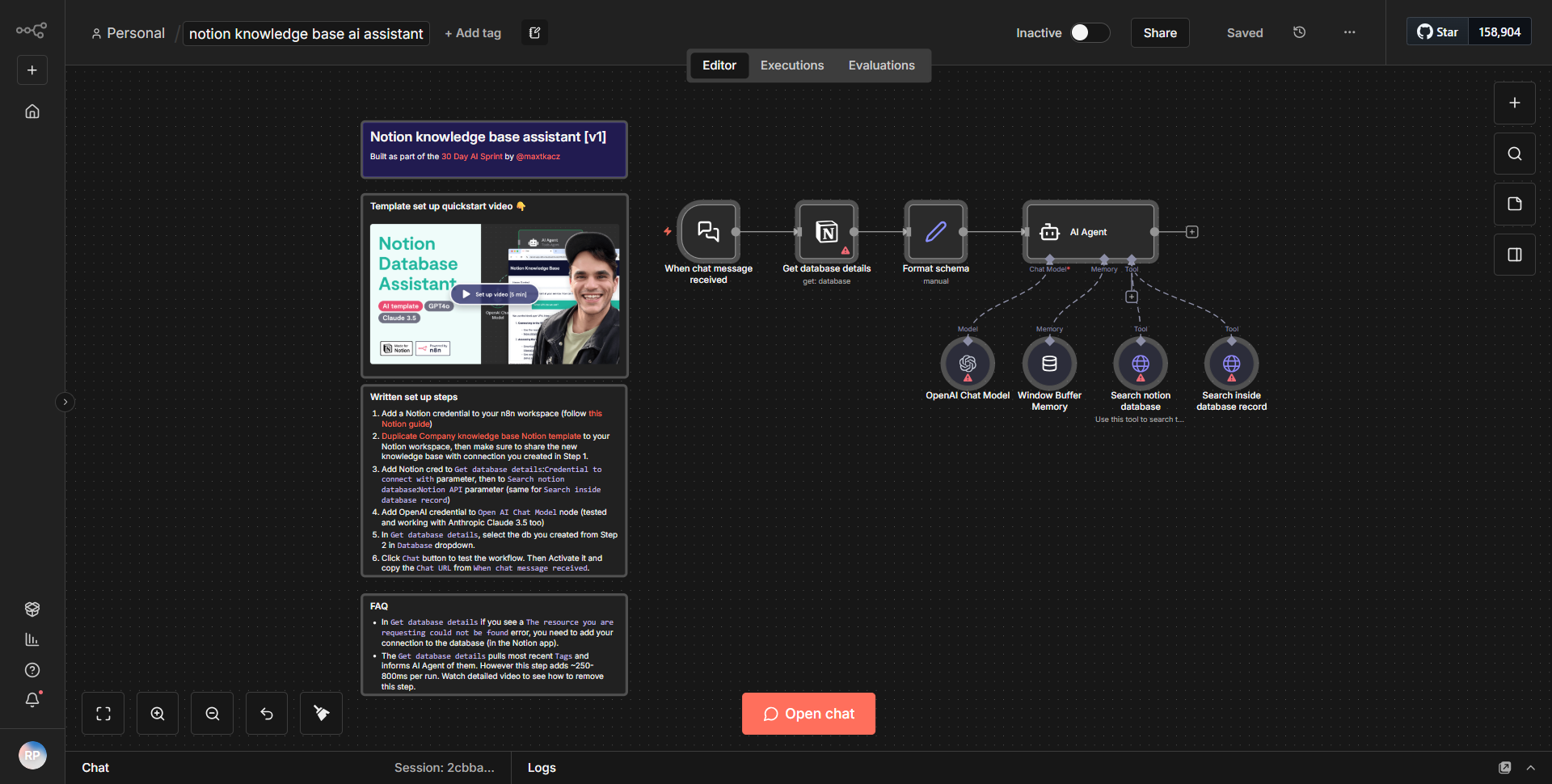
The workflow titled "AI assistant for Notion knowledge repository" is designed to facilitate the retrieval of information from a Notion knowledge base using an AI assistant. The workflow begins with a trigger node that listens for incoming user queries. Once a query is received, the workflow processes it through a series of interconnected nodes to extract relevant information and deliver a response.
1. Trigger Node:
The workflow starts with a webhook trigger that activates upon receiving a request. This node captures the user's inquiry, which is then passed to the subsequent nodes for processing.
2. Notion Node:
Following the trigger, the workflow utilizes a Notion node to search the knowledge base. This node is configured to query specific databases within Notion, using the user's input as the search term. The results from this query are then returned to the workflow.
3. Function Node:
The results from the Notion node are processed in a Function node, which formats the data and prepares it for the AI model. This node may include logic to filter or manipulate the data to ensure that only the most relevant information is sent to the AI.
4. AI Model Node:
The formatted data is then sent to an AI model node, which analyzes the information and generates a response based on the user's query. This node is crucial as it leverages machine learning to provide contextually accurate answers.
5. Response Node:
Finally, the workflow concludes with a response node that sends the AI-generated answer back to the user. This node ensures that the response is delivered in a user-friendly format, completing the interaction.
Throughout this process, data flows seamlessly from one node to the next, with each node performing a specific function that contributes to the overall goal of providing accurate and helpful responses to user inquiries.
Key Features
- Real-time Query Handling:
The workflow is capable of processing user queries in real-time, allowing for immediate responses to inquiries.
- Integration with Notion:
By leveraging Notion's API, the workflow can access a comprehensive knowledge base, ensuring that users receive information that is both relevant and up-to-date.
- AI-Powered Responses:
The integration of an AI model allows for sophisticated understanding and contextualization of user queries, enhancing the quality of responses provided.
- Customizable Logic:
The use of a Function node enables customization of how data is processed and formatted, allowing for tailored responses based on specific needs or user contexts.
- User-Friendly Output:
The final response node ensures that the information is presented in a clear and accessible manner, improving user experience.
Tools Integration
The workflow integrates several tools and services to function effectively:
- Notion:
Utilized through the Notion node for accessing and querying the knowledge base.
- Webhook:
Used as the trigger node to initiate the workflow upon receiving user queries.
- Function Node:
Employed to manipulate and format data before it is sent to the AI model.
- AI Model:
Integrated to analyze the data and generate responses based on user inquiries.
API Keys Required
To ensure the workflow operates correctly, the following API keys and credentials are necessary:
- Notion API Key:
Required for authenticating and accessing the Notion database.
- AI Model API Key:
If the AI model is hosted externally, an API key may be needed for authentication and access.
If no external services are used for the AI model, then no additional API keys are required beyond the Notion API key.