Evaluate Candidates Using AI, alert HR, and store data in a Google Sheet.
Streamlines the evaluation of job candidates through AI, alerts HR about suitable applicants, and records applicant information in a Google Sheet.
How it works
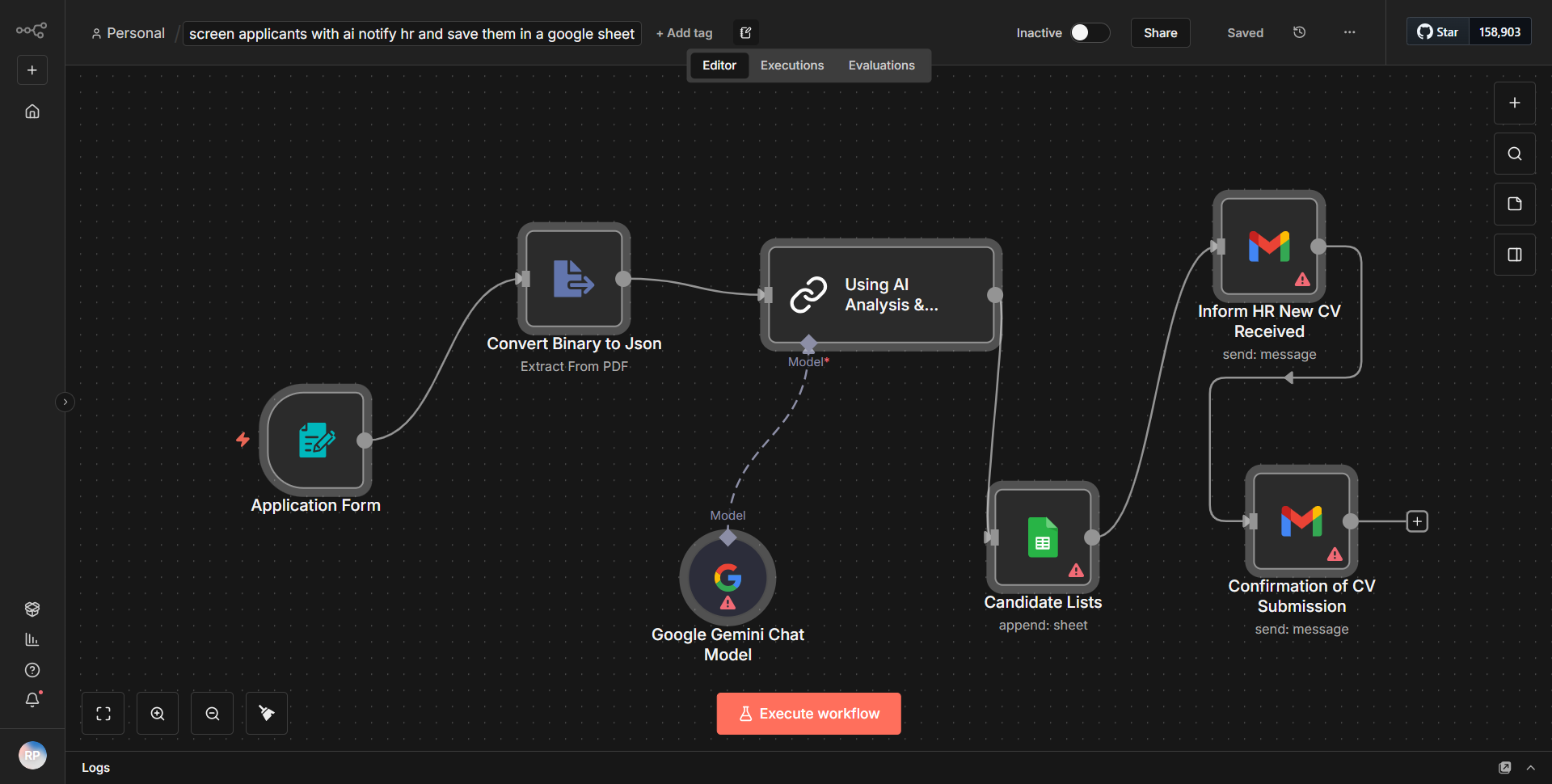
The workflow titled "Evaluate Candidates Using AI, alert HR, and store data in a Google Sheet" is designed to streamline the candidate evaluation process by leveraging AI for assessment, notifying HR about suitable candidates, and storing relevant applicant information in a Google Sheet.
1. Trigger Node:
The workflow begins with a trigger node that activates when a new candidate application is received. This node captures the incoming data, which includes the candidate's details such as name, email, and resume.
2. AI Evaluation Node:
The next step involves an AI evaluation node that processes the candidate's information. This node utilizes an AI model to analyze the candidate's qualifications against predefined criteria. The output of this evaluation is a score or a classification indicating the suitability of the candidate.
3. Conditional Node:
Following the AI evaluation, a conditional node assesses the output from the AI evaluation. If the candidate meets the suitability threshold, the workflow proceeds to the next step; otherwise, it terminates the process for that candidate.
4. HR Notification Node:
If the candidate is deemed suitable, the workflow triggers a notification node that alerts the HR team. This notification can be sent via email or other communication channels, providing HR with the candidate's details and the evaluation results.
5. Google Sheets Node:
Finally, the workflow includes a Google Sheets node that records the candidate's information and evaluation results in a designated spreadsheet. This allows for easy tracking and management of applicants.
The workflow effectively automates the candidate evaluation process, ensuring timely notifications and organized data storage.
Key Features
- Automated Candidate Evaluation:
The workflow utilizes AI to assess candidates based on their qualifications, reducing the manual effort required by HR teams.
- Real-time Notifications:
HR is promptly notified of suitable candidates, allowing for quicker decision-making and engagement.
- Data Storage in Google Sheets:
All candidate information and evaluation results are systematically recorded in Google Sheets, facilitating easy access and management of applicant data.
- Conditional Logic:
The use of conditional nodes ensures that only qualified candidates trigger further actions, optimizing the workflow's efficiency.
Tools Integration
- AI Evaluation Service:
This service is integrated to analyze candidate qualifications and provide a suitability score.
- Email Service:
Used for sending notifications to the HR team about suitable candidates.
- Google Sheets:
The workflow integrates with Google Sheets to store candidate data and evaluation results.
- n8n Nodes:
Specific nodes used in this workflow include the Trigger node, AI Evaluation node, Conditional node, Notification node, and Google Sheets node.
API Keys Required
- Google Sheets API Key:
Required for the Google Sheets node to authenticate and allow data writing to the specified spreadsheet.
- AI Service API Key:
If the AI evaluation service requires authentication, an API key will be necessary to access its functionalities.
No additional API keys or credentials are required beyond those specified for the Google Sheets and AI services.