UTM Link Generator & QR Code Creator
Generates UTM parameters, produces QR codes, and organizes Google Analytics report scheduling.
How it works
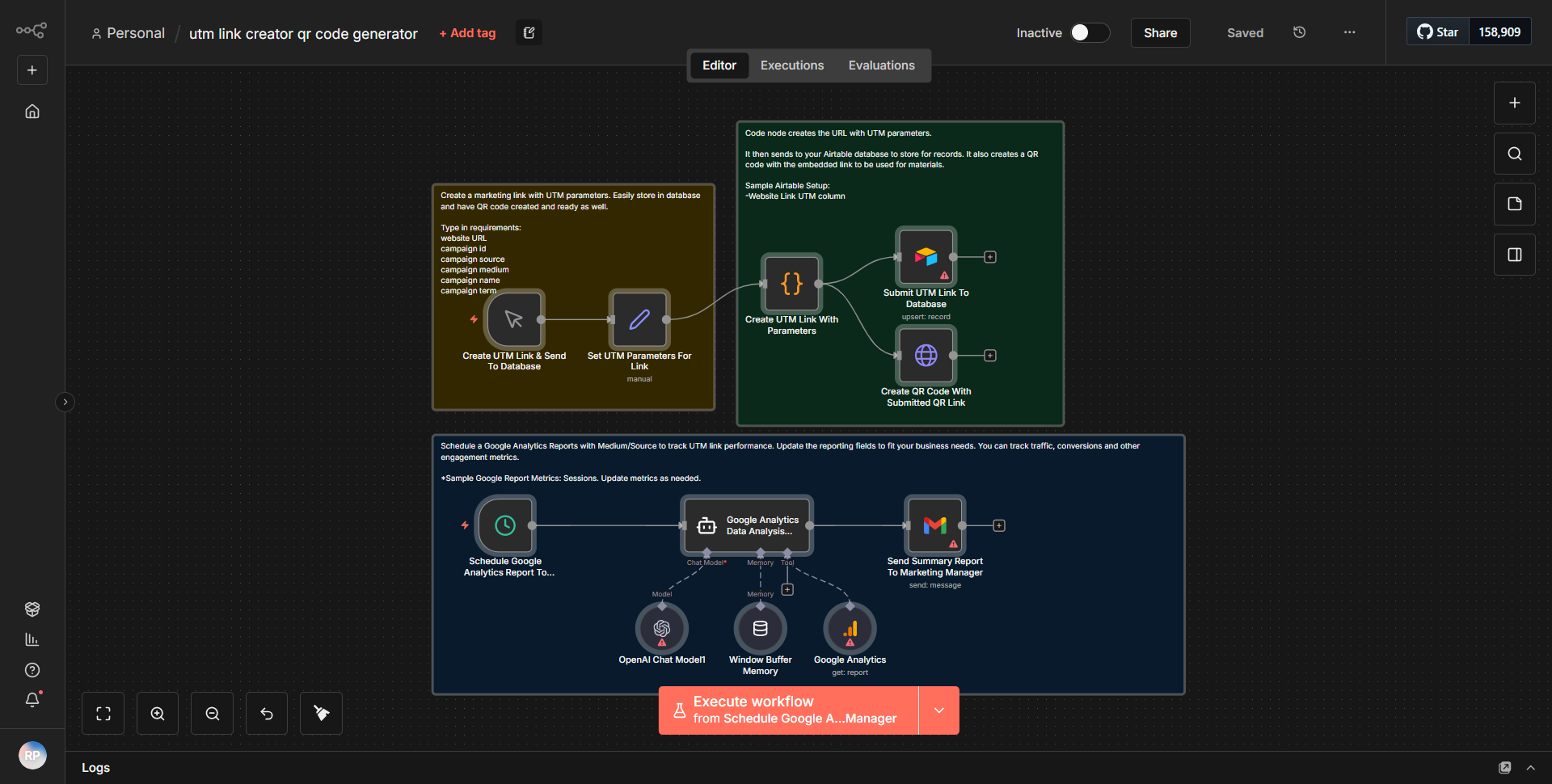
The UTM Link Generator & QR Code Creator workflow is designed to automate the process of generating UTM parameters for tracking URLs, creating QR codes for these links, and organizing the scheduling of Google Analytics reports. The workflow begins with a user input node, where the user provides the necessary parameters such as the base URL, campaign source, medium, and name.
1. Input Node:
The workflow starts with an input node that captures the user-defined parameters for UTM tagging. This includes fields for the base URL, source, medium, campaign name, and any additional parameters.
2. Set Node:
The next step involves a Set node that constructs the UTM parameters based on the input received. This node concatenates the base URL with the UTM parameters to create a complete tracking URL.
3. Function Node:
Following the Set node, a Function node processes the constructed URL to generate a QR code. This node utilizes a specific QR code generation algorithm to convert the URL into a scannable code.
4. HTTP Request Node:
The generated QR code is then sent to an HTTP Request node, which is responsible for storing or sending the QR code image to a specified location, such as a cloud storage service or a database.
5. Google Sheets Node:
Finally, the workflow includes a Google Sheets node that organizes the generated UTM links and corresponding QR codes into a spreadsheet for easy access and reporting. This node allows for the scheduling of Google Analytics reports based on the generated data.
The workflow effectively automates the entire process, ensuring that users can quickly generate UTM links and QR codes without manual intervention.
Key Features
- Automated UTM Parameter Generation:
The workflow automatically constructs UTM parameters based on user input, reducing the chances of human error.
- QR Code Creation:
It generates QR codes from the UTM links, making it easy to share and scan for tracking purposes.
- Google Sheets Integration:
The workflow organizes all generated links and codes into a Google Sheets document, facilitating easy access and management of analytics data.
- Customizable Input:
Users can customize the UTM parameters, allowing for flexibility in tracking different campaigns and sources.
- Streamlined Reporting:
By scheduling Google Analytics reports, the workflow helps users keep track of their marketing efforts efficiently.
Tools Integration
- n8n Nodes Used:
- Input Node:
Captures user input for UTM parameters.
- Set Node:
Constructs the UTM tracking URL.
- Function Node:
Generates the QR code from the URL.
- HTTP Request Node:
Handles the storage or transmission of the QR code image.
- Google Sheets Node:
Organizes and stores the generated links and QR codes in a spreadsheet.
API Keys Required
• No API keys or authentication credentials are explicitly required for the basic functionality of this workflow. However, if the Google Sheets integration is used, appropriate Google API credentials may be necessary to allow access to the user's Google account for reading and writing data.