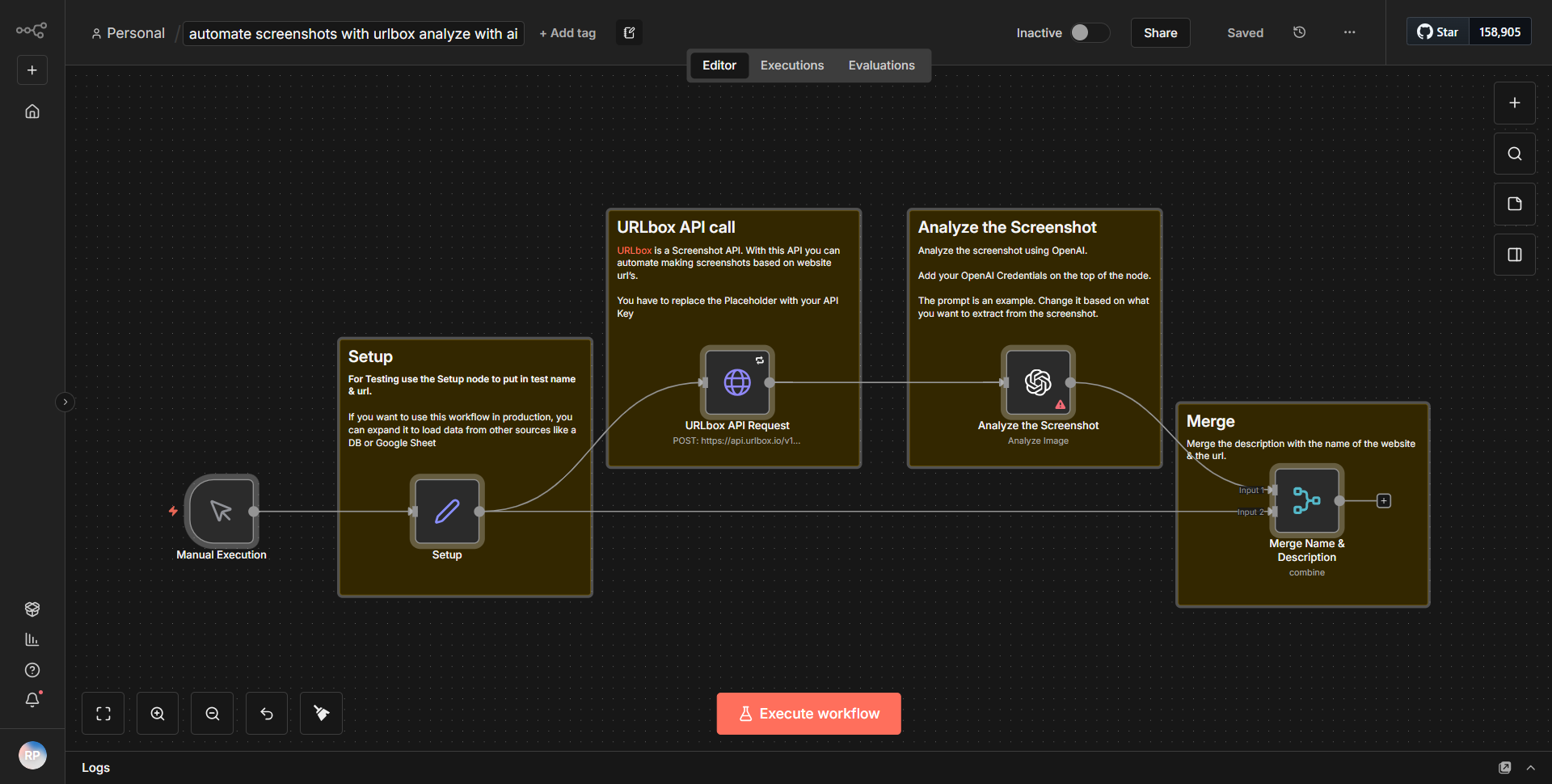
Streamline Screenshot Capture using URLbox and Evaluate with AI
Captures images of websites and processes them through AI analysis.
How it works
The workflow titled "Streamline Screenshot Capture using URLbox and Evaluate with AI" is designed to automate the process of capturing website screenshots and analyzing them using AI. The workflow consists of several interconnected nodes that facilitate this process step-by-step.
1. Start Node:
The workflow begins with a trigger node that initiates the process. This could be a manual trigger or scheduled execution, depending on the configuration.
2. URLbox Node:
The first main action is performed by the URLbox node, which takes a specified URL as input. This node is responsible for capturing a screenshot of the webpage. The URL is passed to the node, which then makes an API call to URLbox to generate the screenshot.
3. Image Processing Node:
Once the screenshot is captured, the image is passed to an image processing node. This node may include operations such as resizing, cropping, or converting the image format, preparing it for analysis.
4. AI Analysis Node:
After processing the image, it is sent to an AI analysis node. This node utilizes an AI service to evaluate the content of the screenshot. The analysis could involve object recognition, text extraction, or sentiment analysis, depending on the specific AI capabilities integrated.
5. Output Node:
Finally, the results of the AI analysis are passed to an output node, which can be configured to send the results via email, store them in a database, or trigger another workflow. This node ensures that the insights gained from the analysis are actionable and can be utilized effectively.
Throughout the workflow, data flows seamlessly from one node to the next, with each node performing its designated function and passing the output to the subsequent node.
Key Features
- Automated Screenshot Capture:
The workflow automates the process of capturing screenshots from specified URLs, saving time and effort compared to manual methods.
- AI-Powered Analysis:
By integrating AI capabilities, the workflow provides valuable insights from the captured images, enabling users to analyze website content effectively.
- Customizable Output Options:
Users can configure the output node to send results to various destinations, such as email or databases, allowing for flexible data handling.
- Image Processing Capabilities:
The inclusion of an image processing node allows for pre-analysis adjustments to the screenshots, ensuring that the images are optimized for AI evaluation.
- Scalability:
The workflow can be easily scaled to handle multiple URLs or integrated into larger systems, making it suitable for various applications in digital marketing, web monitoring, and more.
Tools Integration
The workflow integrates the following tools and services:
- URLbox:
Used for capturing screenshots of websites. The URLbox node is responsible for making API calls to this service to generate images.
- AI Service:
An unspecified AI service is utilized for analyzing the captured screenshots. This could involve various AI capabilities, such as image recognition or text analysis.
- n8n Nodes:
The workflow utilizes several n8n nodes, including:
• Trigger Node: Initiates the workflow.
• URLbox Node: Captures screenshots from URLs.
• Image Processing Node: Prepares images for analysis.
• AI Analysis Node: Evaluates the content of the images.
• Output Node: Manages the results of the analysis.
API Keys Required
To successfully execute this workflow, the following API keys and credentials are required:
- URLbox API Key:
This key is necessary to authenticate requests made to the URLbox service for capturing screenshots.
- AI Service API Key:
If the AI analysis node requires authentication, an API key for the specific AI service being used will be needed.
If there are no additional authentication requirements for the image processing or output nodes, this should be clearly noted.