Bitrix24 Chatbot Integration
Sample workflow for developing a Bitrix24 chatbot featuring webhook integration.
How it works
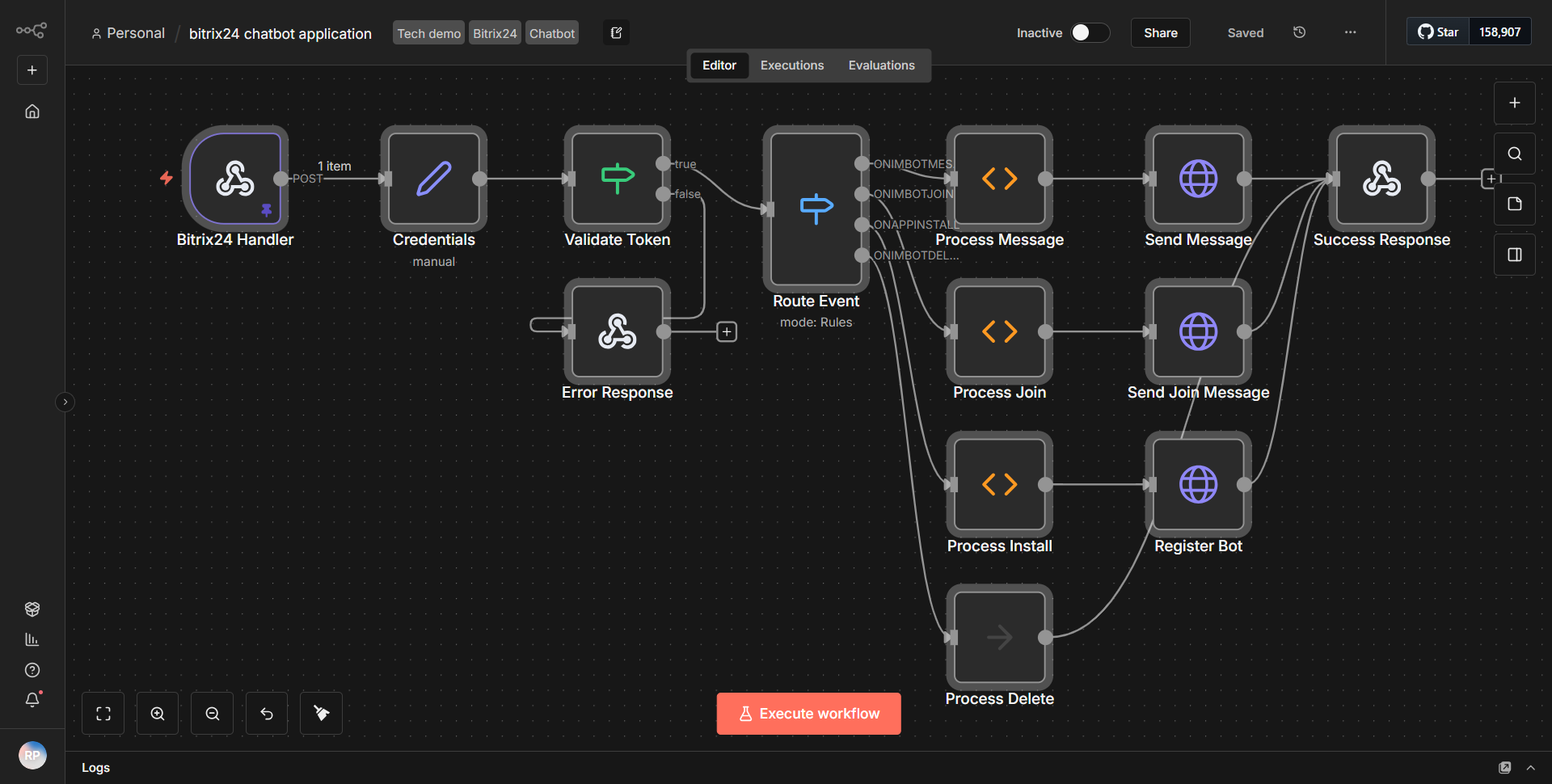
The Bitrix24 Chatbot Integration workflow is designed to facilitate the interaction between users and a chatbot via webhook integration. The workflow begins with a
Webhook
node, which listens for incoming HTTP requests. When a user sends a message to the chatbot, this node captures the data and triggers the workflow.Once the webhook receives the data, it passes the information to a
Set
node. This node is utilized to structure the incoming data, allowing for easier manipulation in subsequent nodes. The Set node typically prepares the data by extracting relevant fields such as the user's message and user ID.Following the Set node, the workflow proceeds to a
Function
node. This node processes the structured data further, potentially applying any necessary business logic or transformations. For instance, it may determine the appropriate response based on the user's input, preparing a reply that the chatbot will send back.After processing the data, the workflow utilizes another
Set
node to format the response that will be sent back to the user. This response is then directed to aHTTP Request
node, which is responsible for sending the formatted message back to the Bitrix24 API, effectively communicating the chatbot's response to the user.Finally, the workflow concludes with an
IF
node that checks for specific conditions, such as whether the response was successfully sent. Depending on the outcome, the workflow can log the result or handle errors accordingly.Key Features
1. Webhook Integration:
The workflow starts with a webhook that allows real-time communication with the chatbot, enabling immediate responses to user inputs.
2. Data Structuring:
The use of Set nodes ensures that incoming data is organized and ready for processing, improving the efficiency of data handling.
3. Custom Logic Processing:
The Function node allows for the implementation of custom logic, enabling the chatbot to provide tailored responses based on user interactions.
4. Dynamic Responses:
The workflow can generate dynamic responses based on user input, enhancing user engagement and satisfaction.
5. Error Handling:
The inclusion of an IF node allows for conditional logic to manage responses effectively, ensuring that errors are logged and handled appropriately.
Tools Integration
- Webhook Node:
Captures incoming HTTP requests from users interacting with the chatbot.
- Set Node:
Structures and prepares incoming data for further processing.
- Function Node:
Processes data and applies business logic to determine responses.
- HTTP Request Node:
Sends formatted responses back to the Bitrix24 API.
- IF Node:
Checks conditions to manage workflow outcomes based on the success or failure of operations.
API Keys Required
To utilize this workflow, you will need to configure API keys and credentials for the Bitrix24 API. Specific API keys are required for authentication to ensure secure communication between the chatbot and the Bitrix24 platform. Ensure that you have the necessary credentials set up in the HTTP Request node for successful integration.