Siri AI Assistant utilizing Apple Shortcuts
Establishes an AI assistant driven by Siri utilizing Apple Shortcuts.
How it works
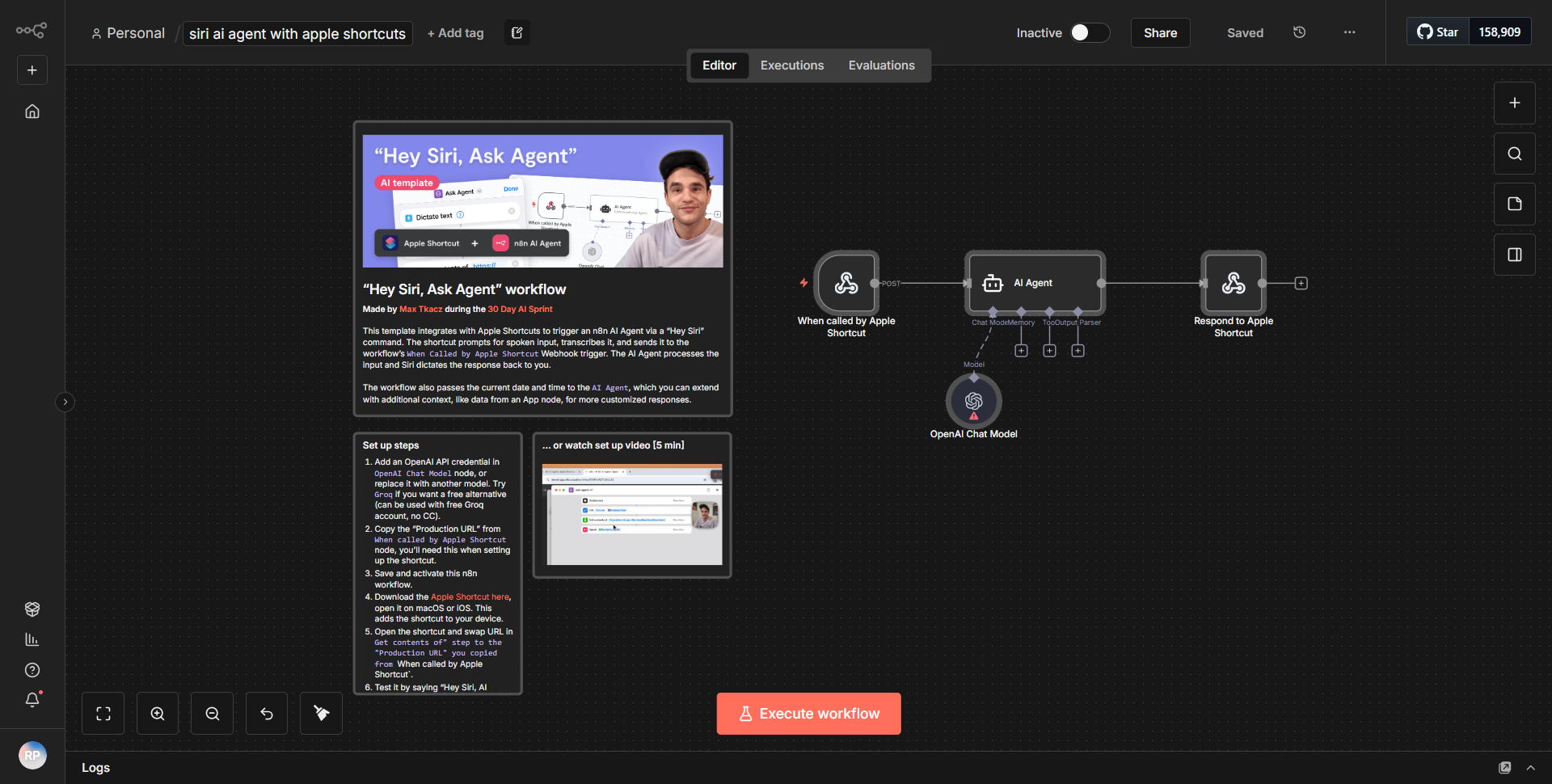
The workflow titled "Siri AI Assistant utilizing Apple Shortcuts" is designed to create an AI assistant that operates through Siri, leveraging Apple Shortcuts for interaction. The workflow begins with a trigger node that listens for incoming requests from Siri. When a user invokes the assistant via Siri, the workflow is activated.
The first node in the sequence is the "Webhook" node, which captures the incoming request. This node is configured to receive data in JSON format, including user queries or commands. Once the webhook receives the data, it passes the information to the next node, which is typically a "Function" or "Set" node. This node processes the input, possibly extracting specific keywords or phrases that the AI will use to formulate a response.
Following the processing, the workflow may include an "HTTP Request" node that sends the processed data to an external AI service, such as OpenAI's API. This node is responsible for making the API call and receiving the AI-generated response. The response is then captured and passed to another node, often a "Set" node, which formats the output to be user-friendly.
Finally, the workflow concludes with a "Respond to Webhook" node, which sends the AI's response back to Siri, allowing the user to hear or see the assistant's reply. The entire process is designed to be seamless, providing users with quick and efficient interactions with the AI assistant.
Key Features
1. Siri Integration:
The workflow allows users to interact with an AI assistant using voice commands through Siri, making it highly accessible and user-friendly.
2. Real-time Processing:
The use of a webhook enables real-time data capture and processing, ensuring that user queries are handled promptly.
3. AI Response Generation:
By integrating with an external AI service, the workflow can generate intelligent and contextually relevant responses to user inquiries.
4. Customizable Commands:
Users can customize the types of queries that the assistant can handle, making the workflow adaptable to various use cases.
5. User-friendly Output:
The final response is formatted for clarity, ensuring that users receive information in an easily digestible manner.
Tools Integration
The workflow utilizes several tools and integrations, including:
- Webhook Node:
Captures incoming requests from Siri.
- Function/Set Node:
Processes and formats the incoming data for further use.
- HTTP Request Node:
Sends data to an external AI service (e.g., OpenAI) and retrieves the AI-generated response.
- Respond to Webhook Node:
Sends the final output back to the user through Siri.
API Keys Required
To operate this workflow, an API key for the external AI service (such as OpenAI) is required. This key is necessary for authenticating requests made from the HTTP Request node. Additionally, any other services integrated into the workflow may require their own API keys or authentication credentials, depending on their specific requirements. If no other services are used, only the AI service key is needed.