Obsidian Notes Spoken Aloud
Transforms Obsidian notes into audio format for a podcast feed.
How it works
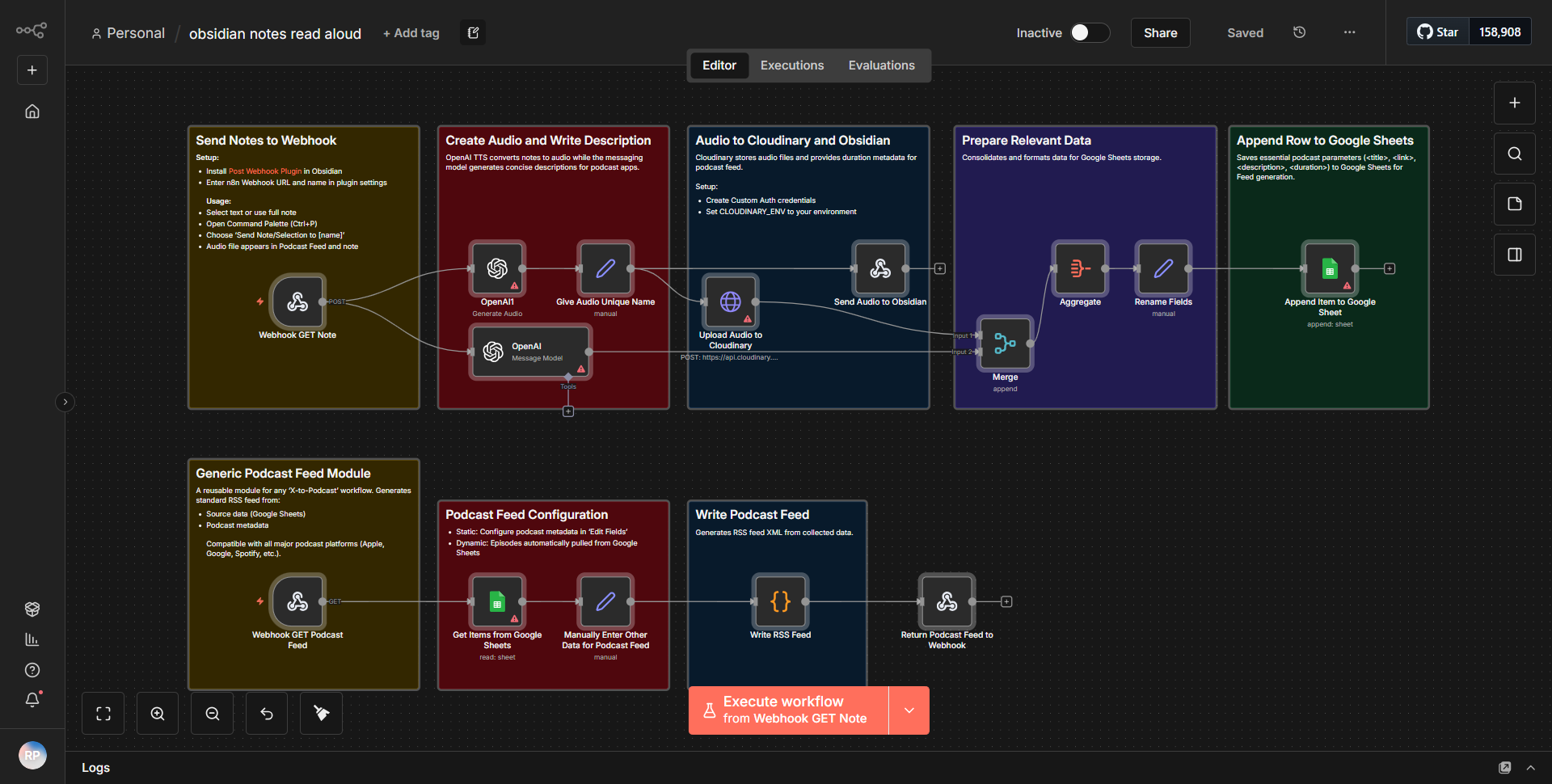
The "Obsidian Notes Spoken Aloud" workflow is designed to convert notes from the Obsidian application into audio format suitable for a podcast feed. The workflow operates through a series of interconnected nodes that facilitate the extraction, processing, and audio generation of the notes.
1. Trigger Node:
The workflow begins with a trigger node that activates when a new note is created or updated in Obsidian. This node monitors the specified folder where the notes are stored.
2. Read File Node:
Once triggered, the workflow utilizes a "Read File" node to access the content of the newly created or updated note. This node extracts the text from the note file, which is typically in Markdown format.
3. Text-to-Speech Node:
The extracted text is then passed to a "Text-to-Speech" node. This node converts the text content into audio format. The user can customize parameters such as voice selection and speech rate to tailor the audio output.
4. Upload to Podcast Feed Node:
After generating the audio file, the workflow includes an "Upload" node that uploads the audio file to a specified podcast feed. This node handles the integration with the podcast hosting service, ensuring that the audio is correctly formatted and uploaded.
5. Notification Node:
Finally, the workflow may include a notification node that sends an alert (via email or messaging service) to inform the user that the new audio file has been successfully created and uploaded.
The data flows seamlessly from one node to the next, ensuring that each step is executed in the correct order, ultimately resulting in a new audio file being available for listeners.
Key Features
- Automated Audio Conversion:
The workflow automates the process of converting text notes into audio files, saving time and effort for users who wish to create podcast content from their written notes.
- Customizable Text-to-Speech Options:
Users can select different voices and adjust speech rates, allowing for a personalized audio experience that can cater to different audience preferences.
- Seamless Integration with Podcast Feeds:
The workflow is designed to directly upload the generated audio files to a podcast feed, making it easy to distribute content without manual intervention.
- Real-time Notifications:
Users receive notifications upon successful audio creation and upload, keeping them informed about the status of their content production.
- Support for Markdown Format:
The workflow can handle notes written in Markdown, which is the standard format used by Obsidian, ensuring compatibility and ease of use.
Tools Integration
The workflow integrates several tools and services through specific n8n nodes:
- Obsidian:
The trigger node monitors changes in the Obsidian application.
- File System:
The "Read File" node accesses the local file system to read the content of the notes.
- Text-to-Speech Service:
The "Text-to-Speech" node utilizes a TTS service to convert text into audio.
- Podcast Hosting Service:
The "Upload" node connects to the podcast hosting platform for audio file distribution.
- Notification Services:
The workflow may include nodes for email or messaging services to send notifications.
API Keys Required
The workflow does not explicitly mention any API keys or authentication credentials required for its operation in the provided JSON or screenshot. It appears to rely on local file access and standard integrations without the need for external API authentication. However, users may need to configure settings for specific nodes, particularly for the podcast hosting service, depending on the platform used.