LINE Integration with Google Calendar and Gmail
Establishes a LINE assistant that connects with Google Calendar and Gmail.
How it works
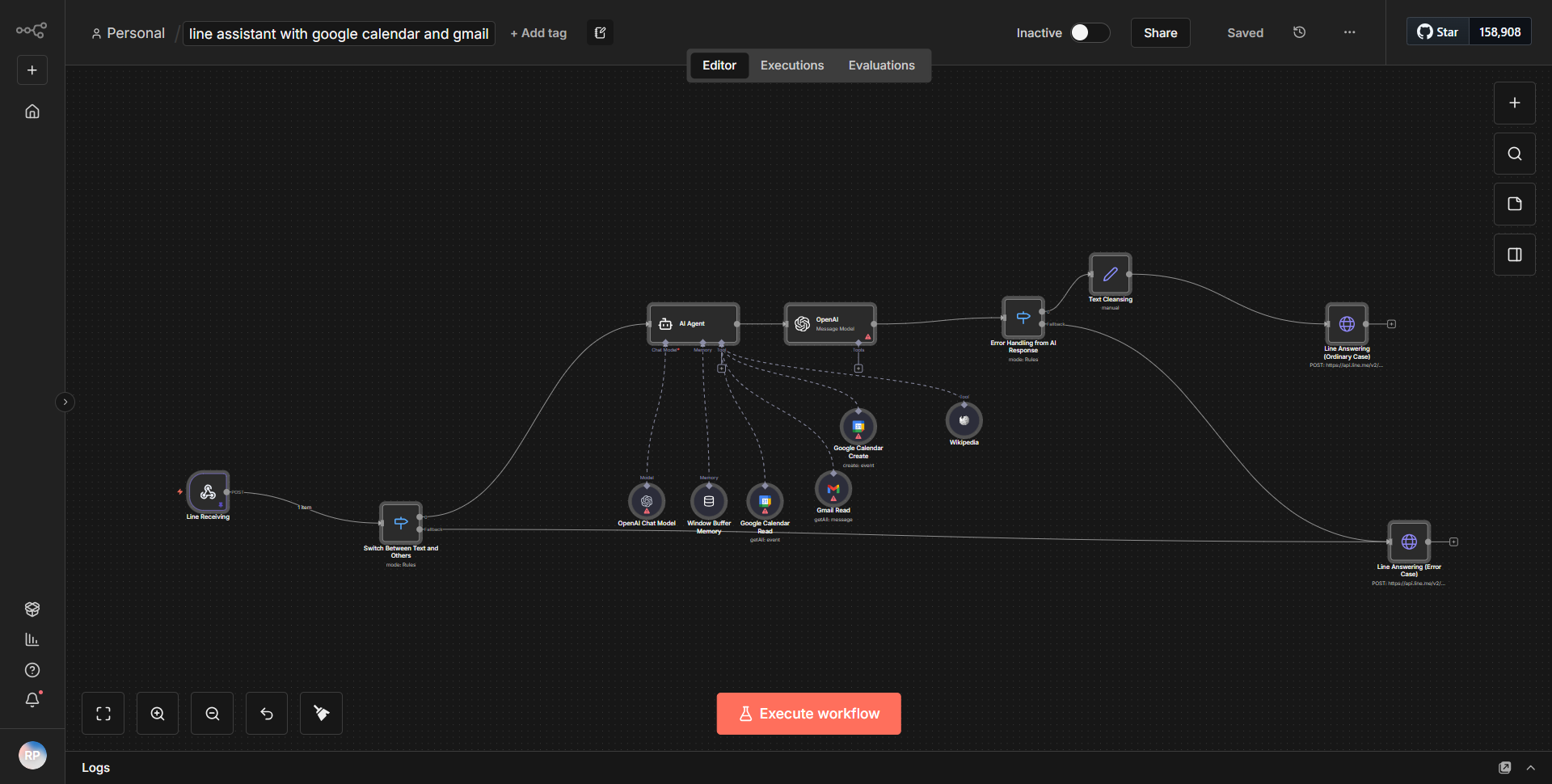
The workflow titled "LINE Integration with Google Calendar and Gmail" establishes a seamless connection between LINE, Google Calendar, and Gmail, allowing users to manage their calendar events and email notifications through a LINE assistant. The workflow operates through a series of interconnected nodes that facilitate data flow and communication between the services.
1. LINE Trigger Node:
The workflow begins with a LINE Trigger node that listens for incoming messages from users on the LINE platform. When a user sends a message, this node captures the event and initiates the workflow.
2. Function Node:
After receiving the message, the workflow utilizes a Function node to process the incoming data. This node extracts relevant information from the user's message, such as event details or commands related to calendar management.
3. Google Calendar Node:
The next step involves a Google Calendar node that interacts with the Google Calendar API. Based on the processed data from the Function node, this node can create, update, or retrieve calendar events. It allows the assistant to check for upcoming events or add new ones as per the user's request.
4. Gmail Node:
Following the calendar interaction, the workflow includes a Gmail node that sends email notifications or confirmations to the user. This node can be triggered to send an email summarizing the calendar event details or any other relevant information as requested by the user.
5. Response to LINE:
Finally, the workflow concludes by sending a response back to the LINE user using another Function node that formats the output appropriately. This ensures that the user receives a clear and concise message regarding their request.
Throughout this process, the nodes are interconnected to ensure a smooth flow of data, with each node performing a specific function that contributes to the overall goal of integrating LINE with Google Calendar and Gmail.
Key Features
- Real-time Interaction:
The workflow enables real-time communication between LINE and Google services, allowing users to manage their calendar and emails without leaving the LINE app.
- Event Management:
Users can create, update, and retrieve calendar events directly through LINE, making it convenient for users to stay organized.
- Email Notifications:
The integration with Gmail allows for automatic email notifications, ensuring users are informed about their calendar events and any relevant updates.
- Customizable Responses:
The use of Function nodes allows for tailored responses based on user input, enhancing the user experience by providing personalized feedback.
- Seamless Integration:
The workflow effectively combines multiple services (LINE, Google Calendar, and Gmail) into a single assistant, streamlining tasks for users.
Tools Integration
- LINE:
Utilized for user interaction through the LINE Trigger node, enabling the assistant to receive messages.
- Google Calendar:
Integrated via the Google Calendar node, allowing for the management of calendar events.
- Gmail:
Incorporated through the Gmail node to send email notifications and confirmations.
- Function Nodes:
Used multiple times to process data and format responses, enhancing the functionality of the workflow.
API Keys Required
To operate this workflow, the following API keys and authentication credentials are necessary:
- LINE Messaging API Key:
Required for the LINE Trigger node to authenticate and receive messages from users.
- Google Calendar API Key:
Needed for the Google Calendar node to access and manage calendar events.
- Gmail API Key:
Required for the Gmail node to send emails on behalf of the user.
These API keys must be configured correctly in the n8n environment to ensure the workflow functions as intended.