Improve Customer Communication using Twilio and Redis
Establishes message queuing for client conversations utilizing Twilio and Redis.
How it works
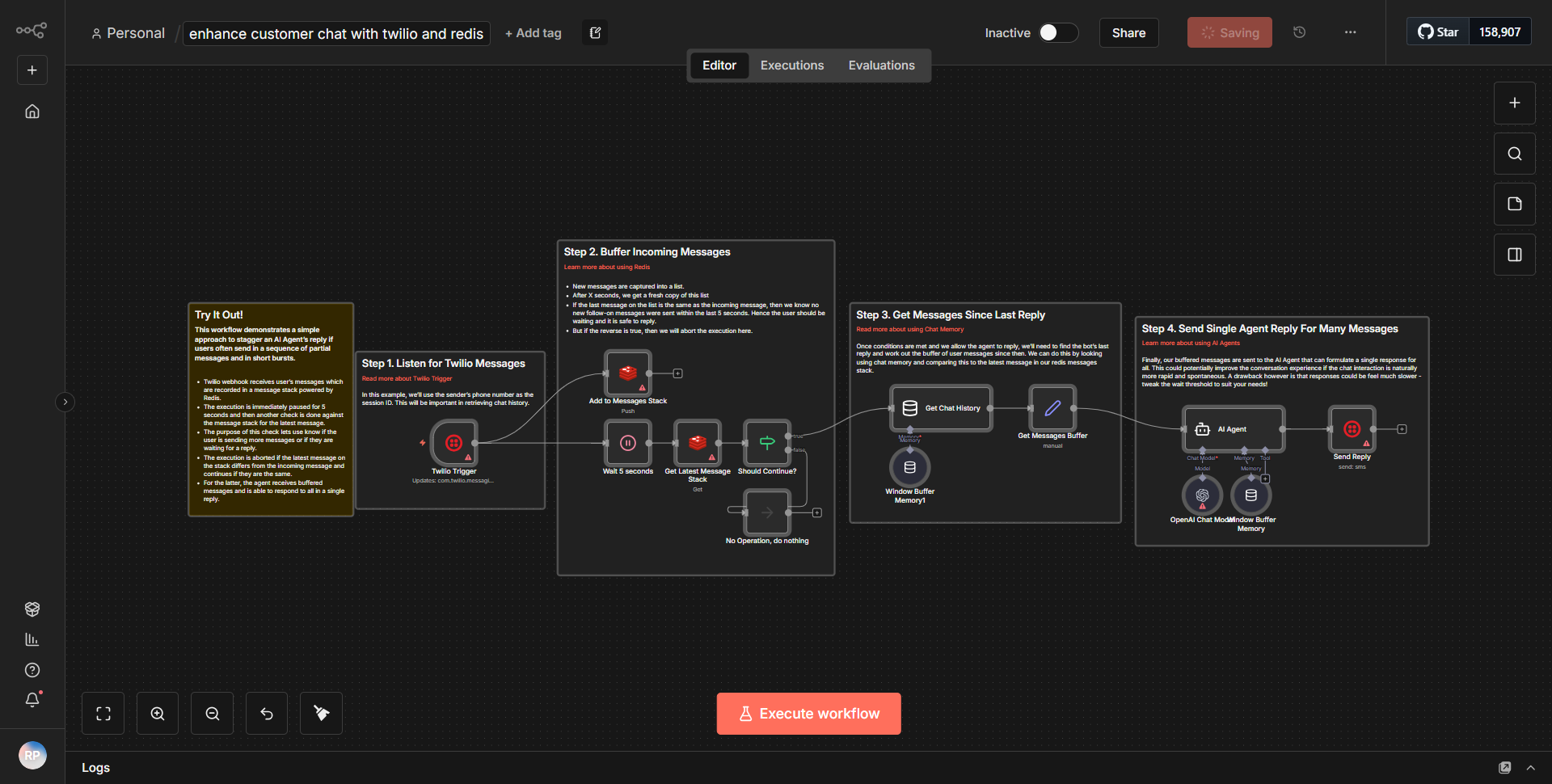
The workflow titled "Improve Customer Communication using Twilio and Redis" is designed to enhance client interactions by establishing a message queuing system. The workflow operates through a series of interconnected nodes that facilitate the sending and receiving of messages via Twilio while utilizing Redis for message storage and retrieval.
1. Trigger Node:
The workflow begins with a trigger node that listens for incoming messages. This node is responsible for initiating the workflow whenever a new message is received from the client.
2. Redis Node:
Once a message is triggered, the workflow utilizes a Redis node to store the incoming message. This node is configured to save the message content along with relevant metadata, such as the sender's information and timestamp. This ensures that messages are queued properly for further processing.
3. Twilio Node:
After storing the message in Redis, the workflow proceeds to a Twilio node. This node is responsible for sending the message to the intended recipient. The configuration includes the recipient's phone number and the message body, which is retrieved from the Redis storage.
4. Response Handling:
Following the message dispatch, the workflow may include additional nodes to handle responses from the recipient. This could involve checking for replies and updating the Redis storage accordingly to maintain an accurate record of the conversation.
5. Completion Node:
Finally, the workflow concludes with a completion node that ensures all processes are finalized, and any necessary notifications or logs are generated to confirm the successful execution of the workflow.
Throughout this process, the data flows seamlessly from the trigger to Redis, then to Twilio, and back, ensuring efficient communication and message management.
Key Features
- Message Queuing:
The workflow effectively queues messages using Redis, allowing for organized and efficient handling of client conversations.
- Real-Time Communication:
By integrating Twilio, the workflow enables real-time messaging capabilities, ensuring that clients receive timely responses.
- Scalability:
The use of Redis for message storage allows the workflow to scale easily, accommodating a growing number of client interactions without performance degradation.
- Error Handling:
The workflow can be configured to manage errors gracefully, ensuring that any issues in message delivery are logged and addressed without disrupting the overall communication flow.
- Customizable:
Users can modify the workflow to include additional nodes or alter existing configurations to better suit their specific communication needs.
Tools Integration
The workflow integrates the following tools and services:
- Twilio:
Utilized for sending and receiving SMS messages. The Twilio node is responsible for handling the communication with the Twilio API.
- Redis:
Used for message storage and queuing. The Redis node facilitates the saving and retrieval of messages, ensuring that the workflow can manage conversations effectively.
- n8n:
The entire workflow is built within the n8n platform, which provides the necessary nodes and functionalities to connect these services seamlessly.
API Keys Required
To operate this workflow, the following API keys and credentials are required:
- Twilio API Key:
Necessary for authenticating requests to the Twilio service. This key must be configured in the Twilio node settings.
- Twilio Auth Token:
Also required for Twilio authentication, this token works in conjunction with the API key to ensure secure communication with the Twilio API.
- Redis Configuration:
The Redis node requires connection details such as the Redis server URL and any necessary authentication credentials to access the Redis database.
No additional API keys or authentication configurations are needed beyond those specified for Twilio and Redis.