Examine and Organize Potentially Malicious Email Content Using ChatGPT
Evaluates potentially harmful emails through ChatGPT, categorizes them, and can produce screenshots for examination. Assists in recognizing and organizing emails that may pose a threat.
How it works
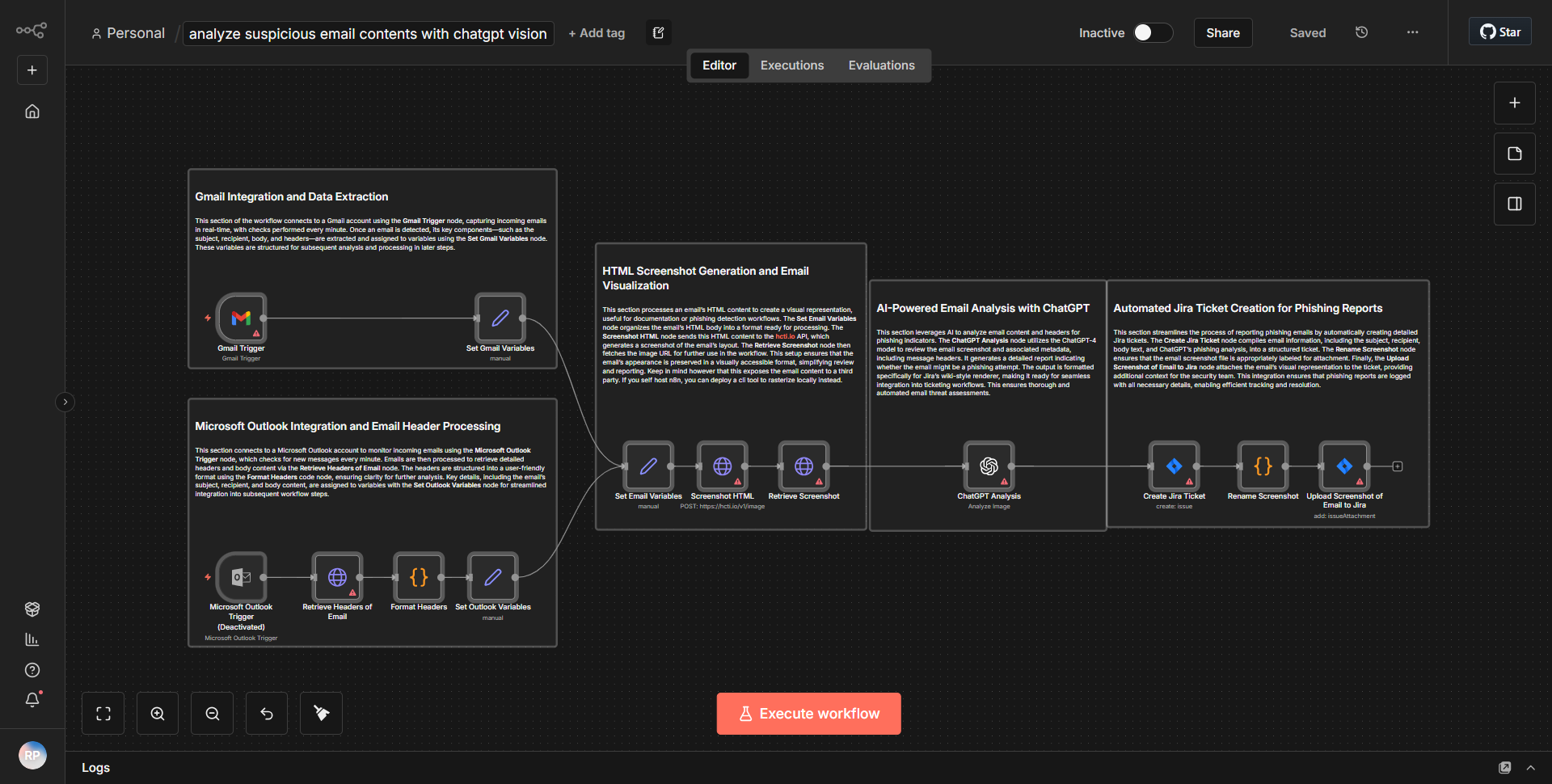
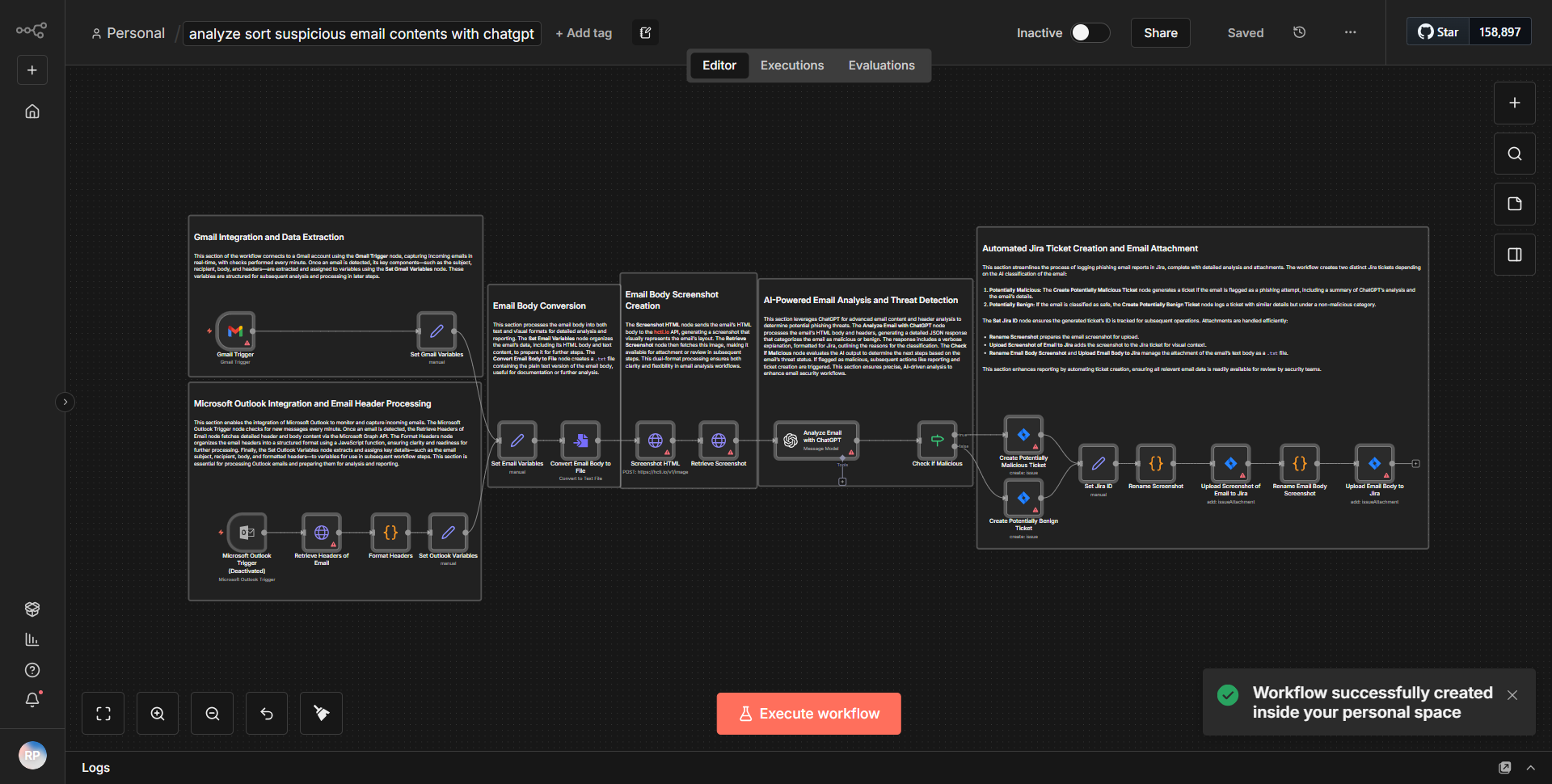
The workflow titled "Examine and Organize Potentially Malicious Email Content Using ChatGPT" is designed to evaluate and categorize potentially harmful emails using the capabilities of ChatGPT. The workflow begins with a trigger node that listens for incoming emails. Once an email is received, the workflow extracts relevant content, such as the subject and body of the email.
Next, the extracted email content is sent to a ChatGPT node, where it undergoes analysis. ChatGPT evaluates the content for potential threats, categorizing it based on predefined criteria, such as phishing attempts or malware distribution. The response from ChatGPT includes a classification of the email and any relevant insights regarding its potential malicious nature.
Following the analysis, the workflow may include a screenshot generation node, which captures the email's content visually for further examination. This step is crucial for documentation and review purposes. Finally, the categorized email content, along with any screenshots, is organized and stored in a designated location, ensuring that all potentially harmful emails are easily accessible for future reference.
Key Features
1. Automated Email Analysis:
The workflow automates the process of evaluating incoming emails for potential threats, significantly reducing manual review time.
2. Integration with ChatGPT:
By leveraging ChatGPT's natural language processing capabilities, the workflow can provide nuanced insights into the content of emails, enhancing threat detection accuracy.
3. Categorization of Threats:
The workflow categorizes emails based on their threat level, allowing users to prioritize responses to the most dangerous emails.
4. Screenshot Generation:
The capability to generate screenshots of suspicious emails aids in visual documentation, making it easier for security teams to review and analyze threats.
5. Organized Storage:
The workflow ensures that all analyzed emails are stored in an organized manner, facilitating easy retrieval and further investigation.
Tools Integration
The workflow integrates several tools and services, including:
- Email Trigger Node:
Captures incoming emails to initiate the workflow.
- ChatGPT Node:
Utilizes the ChatGPT API for analyzing email content and providing threat assessments.
- Screenshot Node:
Generates visual representations of email content for documentation purposes.
- Data Storage Node:
Organizes and stores the analyzed email data and screenshots for future reference.
API Keys Required
To successfully execute this workflow, the following API keys and credentials are required:
- ChatGPT API Key:
Necessary for authenticating requests to the ChatGPT service for content analysis.
- Email Service Credentials:
Depending on the email service used, relevant credentials may be needed to access incoming emails.
No additional API keys or authentication configurations are mentioned in the workflow, indicating that the primary focus is on the integration with ChatGPT and the email service.