Automatically Classify Outlook Emails Using AI
Automates the classification of Outlook emails through AI algorithms. Organizes messages into folders and designates categories according to their content, minimizing the need for manual sorting.
How it works
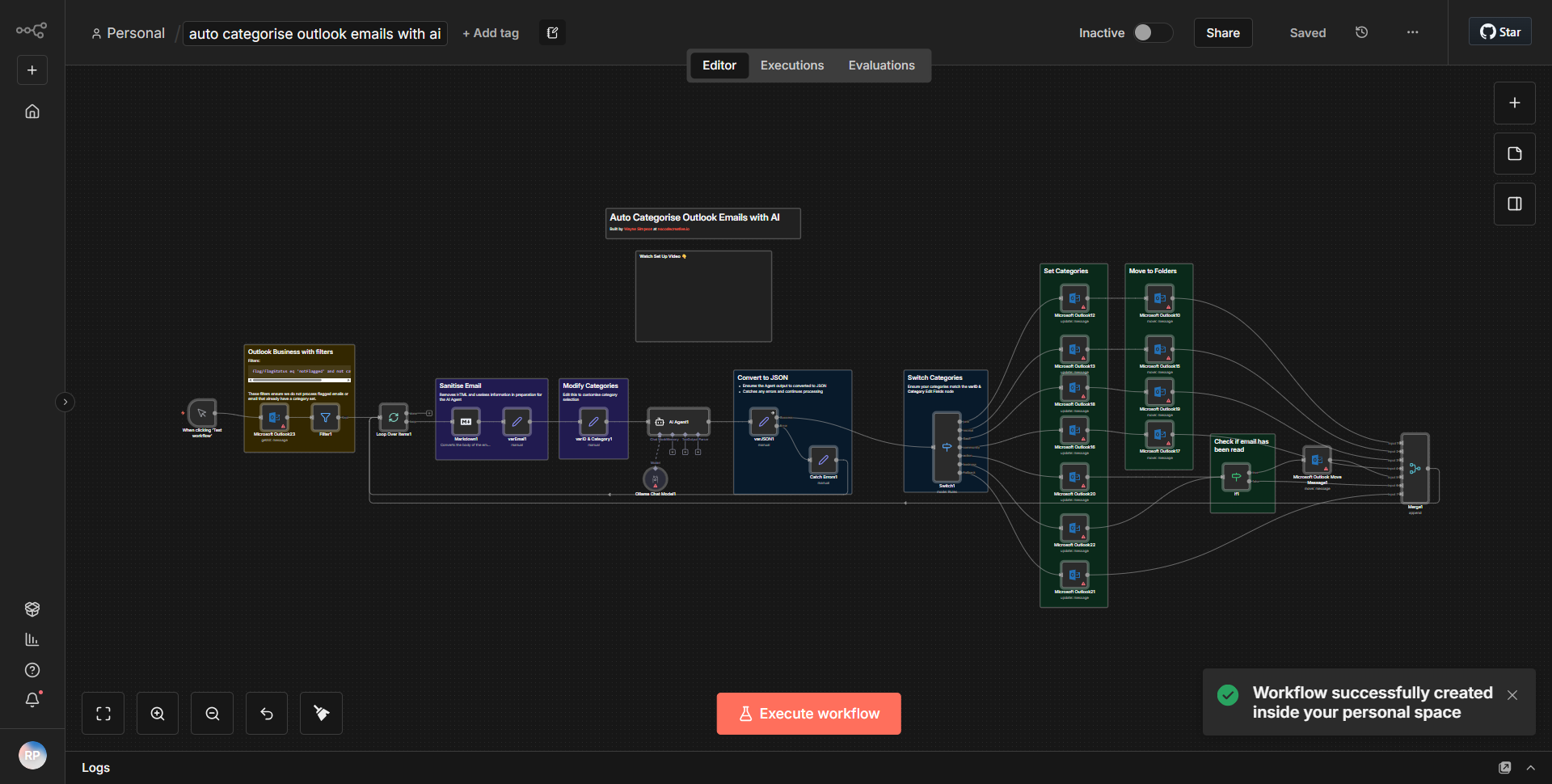
The workflow titled "Automatically Classify Outlook Emails Using AI" is designed to streamline the process of sorting and categorizing emails received in an Outlook account. It operates through a series of interconnected nodes that facilitate the retrieval, analysis, and organization of emails based on their content.
1. Trigger Node:
The workflow begins with the "Microsoft Outlook Trigger" node, which is set to activate whenever a new email arrives in the specified Outlook inbox. This node captures essential details of the incoming email, such as the subject, body, and sender information.
2. AI Classification Node:
Following the trigger, the workflow utilizes an "AI Model" node that processes the email content. This node employs machine learning algorithms to analyze the text within the email and classify it into predefined categories based on its content. The classification results are then outputted as labels.
3. Conditional Logic Node:
The next step involves a "Switch" node that evaluates the classification labels generated by the AI model. Depending on the category assigned to the email, the workflow branches out into different paths. Each path corresponds to a specific folder in the Outlook account.
4. Move Email Node:
For each category identified, a "Microsoft Outlook Move Email" node is triggered. This node takes the original email and moves it to the appropriate folder based on the classification. This ensures that emails are organized correctly without manual intervention.
5. End Node:
Finally, the workflow concludes with an "End" node, which signifies the completion of the process.
Throughout this workflow, data flows seamlessly from one node to another, ensuring that emails are not only received but also intelligently categorized and stored in the correct locations.
Key Features
- Automated Email Classification:
The primary feature of this workflow is its ability to automatically classify incoming emails using AI, reducing the need for manual sorting and saving time for users.
- Dynamic Folder Organization:
Emails are moved to specific folders based on their content classification, which helps maintain an organized inbox and improves email management.
- AI Integration:
The use of an AI model for classification allows for more accurate sorting based on the context of the email, adapting to various types of content.
- Real-Time Processing:
The workflow operates in real-time, ensuring that emails are categorized and organized as soon as they arrive in the inbox.
- Customizable Categories:
Users can modify the classification categories based on their specific needs, allowing for tailored email management.
Tools Integration
The workflow integrates with the following tools and services:
- Microsoft Outlook:
Utilized for receiving and organizing emails. The specific nodes used are:
• Microsoft Outlook Trigger
• Microsoft Outlook Move Email
- AI Model:
This node is responsible for processing the email content and performing the classification.
API Keys Required
No API keys or authentication credentials are explicitly required for this workflow to function, as it utilizes built-in integrations provided by n8n for Microsoft Outlook and the AI model. Users must ensure they have the necessary permissions and access to their Outlook account for the workflow to operate correctly.