Assess responses from Pipedrive contacts using AI
Employs AI to assess and classify responses from contacts in Pipedrive.
How it works
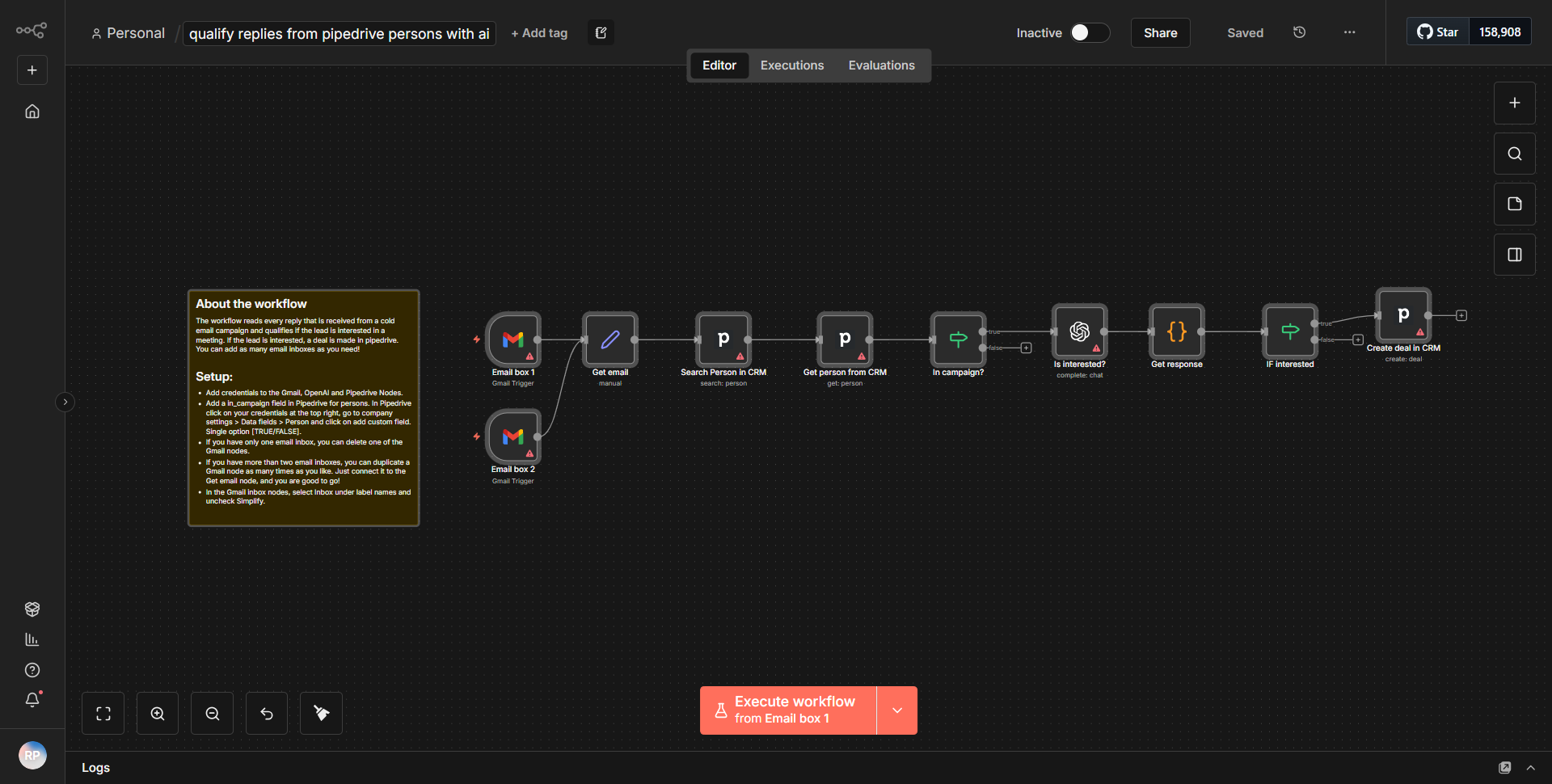
The workflow titled "Assess responses from Pipedrive contacts using AI" is designed to automate the assessment and classification of responses received from contacts in Pipedrive. The workflow begins with a trigger node that activates when a new response is received. This is typically set up using the Pipedrive node, which listens for updates or new entries in the contacts' responses.
Once a response is detected, the workflow proceeds to pass the data to an AI node, which is responsible for analyzing the content of the response. This AI node utilizes a natural language processing model to evaluate the sentiment or intent of the response. The output from the AI node is then processed to determine the classification of the response, which may include categories such as positive, negative, or neutral.
Following the assessment, the workflow may include a decision-making node that routes the data based on the classification result. For instance, if the response is classified as positive, it might trigger a follow-up action, such as sending a thank-you email or scheduling a meeting. Conversely, if the response is negative, the workflow could initiate a different set of actions, such as alerting a sales representative or logging the response for further review.
The final step in the workflow involves updating the Pipedrive contact with the classification result, ensuring that the contact's record reflects the latest assessment. This systematic flow of data ensures that responses are not only analyzed but also acted upon in a timely manner, enhancing the overall efficiency of the sales process.
Key Features
1. Automated Response Assessment:
The workflow automates the process of evaluating responses from Pipedrive contacts, reducing manual effort and increasing efficiency.
2. AI-Powered Classification:
By leveraging AI, the workflow provides accurate sentiment analysis, allowing for better understanding and categorization of contact responses.
3. Dynamic Decision Making:
The inclusion of decision nodes enables the workflow to take different actions based on the classification of responses, tailoring follow-up actions to the context of each interaction.
4. Seamless Integration with Pipedrive:
The workflow directly integrates with Pipedrive, ensuring that all updates and classifications are reflected in the contact records, facilitating better customer relationship management.
5. Customizable Actions:
Users can customize the actions taken based on the response classifications, allowing for flexibility in how the workflow operates according to specific business needs.
Tools Integration
The workflow integrates the following tools and services:
- Pipedrive:
Utilized for managing contacts and their responses. The Pipedrive node is used to trigger the workflow and update contact records.
- AI Node:
This node is responsible for performing the analysis of the responses using natural language processing techniques. The specific AI service used can vary based on the configuration but is essential for the classification step.
API Keys Required
To operate this workflow, the following API keys and credentials are necessary:
- Pipedrive API Key:
Required for authenticating and accessing the Pipedrive account to retrieve contact responses and update records.
- AI Service API Key:
If a specific AI service is used for natural language processing, an API key for that service will also be required.
If no external AI service is utilized, then only the Pipedrive API key is necessary.