Twitter Digital AI Persona
Handles the Twitter account of a virtual AI influencer.
How it works
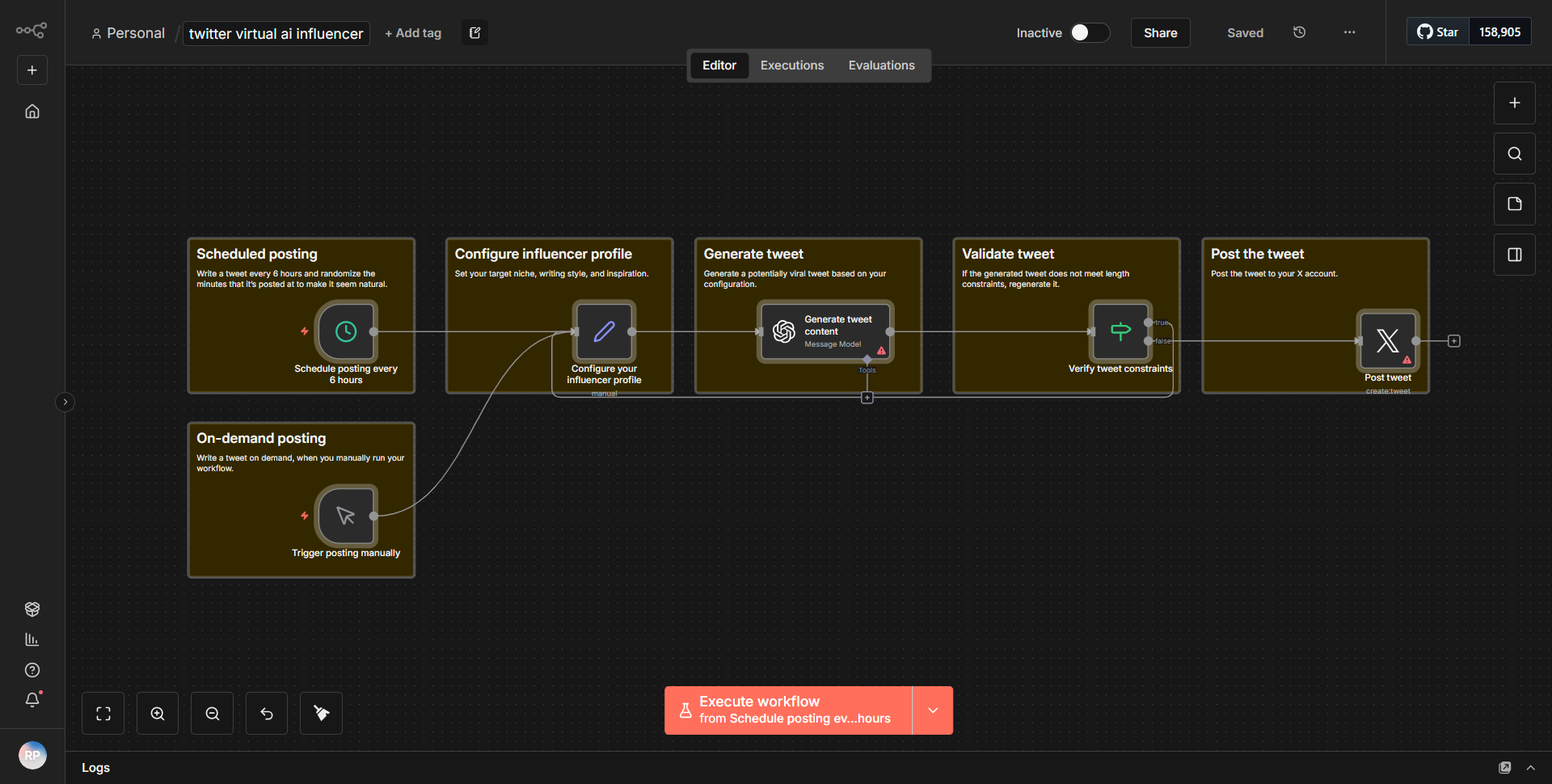
The "Twitter Digital AI Persona" workflow is designed to manage a Twitter account for a virtual AI influencer. The workflow initiates with a scheduled trigger that activates at specified intervals. This trigger is connected to a series of nodes that collectively handle the process of generating and posting content on Twitter.
1. Trigger Node:
The workflow begins with a Cron node that schedules the workflow to run at defined times, ensuring regular updates and interactions on the Twitter account.
2. Text Generation Node:
Following the trigger, a "Function" node is utilized to generate dynamic content. This node processes the input data and creates a text output that serves as the tweet content. The function can include logic to vary the messages based on time or other parameters.
3. Twitter Node:
The generated text is then passed to the Twitter node, which is configured to post tweets. This node requires the content generated from the previous node and is responsible for sending the tweet to the specified Twitter account.
4. Error Handling:
The workflow includes error handling mechanisms to ensure that if any node fails (for instance, if the Twitter API is unreachable), the workflow can log the error or send notifications to the user, maintaining robustness.
The flow of data is linear, moving from the trigger to content generation, and finally to posting on Twitter, with built-in error handling to ensure reliability.
Key Features
- Automated Content Posting:
The workflow automates the process of posting tweets at scheduled intervals, allowing for consistent engagement with followers without manual intervention.
- Dynamic Content Generation:
The use of a Function node enables the generation of unique and varied tweets, enhancing the engagement potential by avoiding repetitive content.
- Error Handling:
The workflow includes mechanisms to handle errors gracefully, ensuring that failures do not disrupt the overall functionality and that issues are logged for review.
- Scheduled Interactions:
The Cron trigger allows for precise control over when tweets are posted, which can be tailored to peak engagement times for the audience.
Tools Integration
- n8n Cron Node:
Used to schedule the workflow execution at defined intervals.
- n8n Function Node:
Utilized for generating dynamic tweet content based on logic defined within the node.
- n8n Twitter Node:
Integrates with the Twitter API to post tweets on the specified Twitter account.
API Keys Required
- Twitter API Key:
Required for the Twitter node to authenticate and post tweets.
- Twitter API Secret:
Necessary for secure access to the Twitter account.
- Access Token:
Required to allow the workflow to act on behalf of the Twitter account.
- Access Token Secret:
Completes the authentication process for posting tweets.
These credentials must be configured within the Twitter node to ensure proper functionality of the workflow.