Sentiment analysis of customer feedback using AI
Analysis of customer feedback sentiment.
How it works
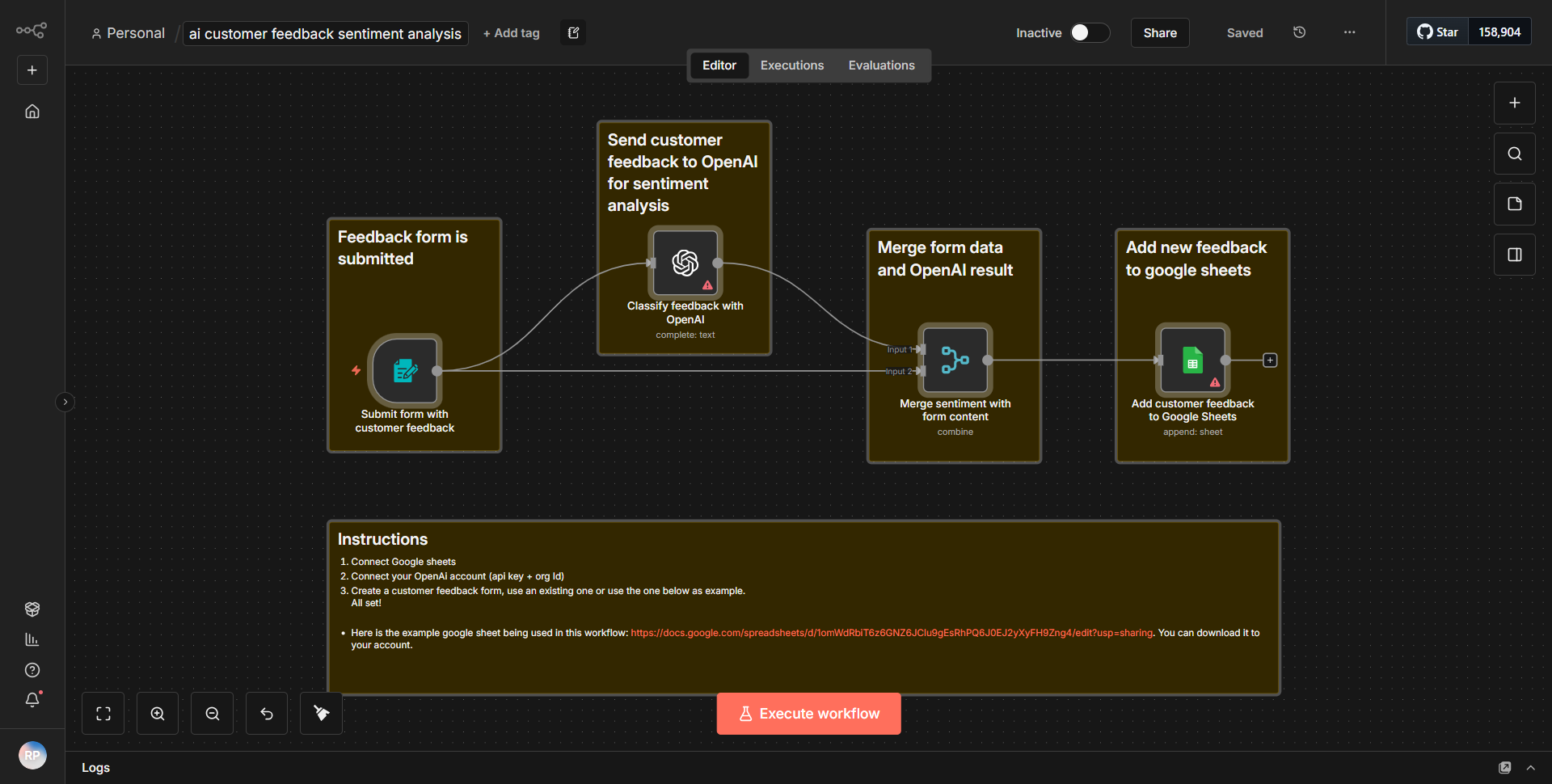
The workflow titled "Sentiment analysis of customer feedback using AI" is designed to analyze customer feedback and determine the sentiment expressed within it. The workflow consists of several interconnected nodes that facilitate the flow of data from the initial input to the final output.
1. Start Node:
The workflow begins with a trigger node that initiates the process. This could be set to respond to an event, such as receiving new customer feedback.
2. Input Node:
The next node collects customer feedback data. This data can come from various sources, such as a web form or an API that aggregates customer responses.
3. AI Sentiment Analysis Node:
The core of the workflow is the AI sentiment analysis node, which processes the customer feedback. This node utilizes a machine learning model or an external API to evaluate the sentiment of the text, categorizing it as positive, negative, or neutral.
4. Output Node:
After the sentiment analysis is complete, the results are sent to an output node. This could be configured to send the results to a database, a dashboard for visualization, or an email notification to stakeholders.
5. Error Handling:
The workflow includes error handling mechanisms to ensure that any issues encountered during the process are logged and addressed, allowing for smooth operation and reliability.
Throughout the workflow, data flows seamlessly from one node to the next, with each node performing a specific function that contributes to the overall goal of sentiment analysis.
Key Features
- Automated Sentiment Analysis:
The workflow automates the process of analyzing customer feedback, saving time and reducing manual effort.
- Real-time Processing:
It can process feedback in real-time, allowing businesses to respond quickly to customer sentiments.
- Customizable Output:
Users can customize how the sentiment results are presented, whether through reports, dashboards, or notifications.
- Error Handling:
The inclusion of error handling ensures that the workflow can manage unexpected issues without failing entirely.
- Integration with AI:
By leveraging AI for sentiment analysis, the workflow provides more accurate and nuanced insights compared to traditional methods.
Tools Integration
The workflow integrates with various tools and services to enhance its functionality:
- n8n Nodes:
The specific nodes used in this workflow include:
• Trigger Node: Initiates the workflow based on specific events.
• Input Node: Captures customer feedback data.
• AI Sentiment Analysis Node: Performs the sentiment analysis using AI techniques.
• Output Node: Sends the analyzed results to the desired destination.
API Keys Required
To operate this workflow effectively, the following API keys or credentials may be required:
- AI Sentiment Analysis API Key:
If the sentiment analysis is performed using an external API, a valid API key will be necessary to authenticate requests.
- Database/API Credentials:
If the output is directed to a database or another API, appropriate credentials for those services will also be needed.
If there are no external APIs or services involved, then no API keys are required.