vAssistant for HubSpot Chat utilizing OpenAI and Airtable
This workflow connects an OpenAI assistant to HubSpot Chat and Airtable, enabling automated replies and the management of customer engagements. It retrieves chat messages, utilizes AI for processing, and has the capability to save pertinent information in Airtable.
How it works
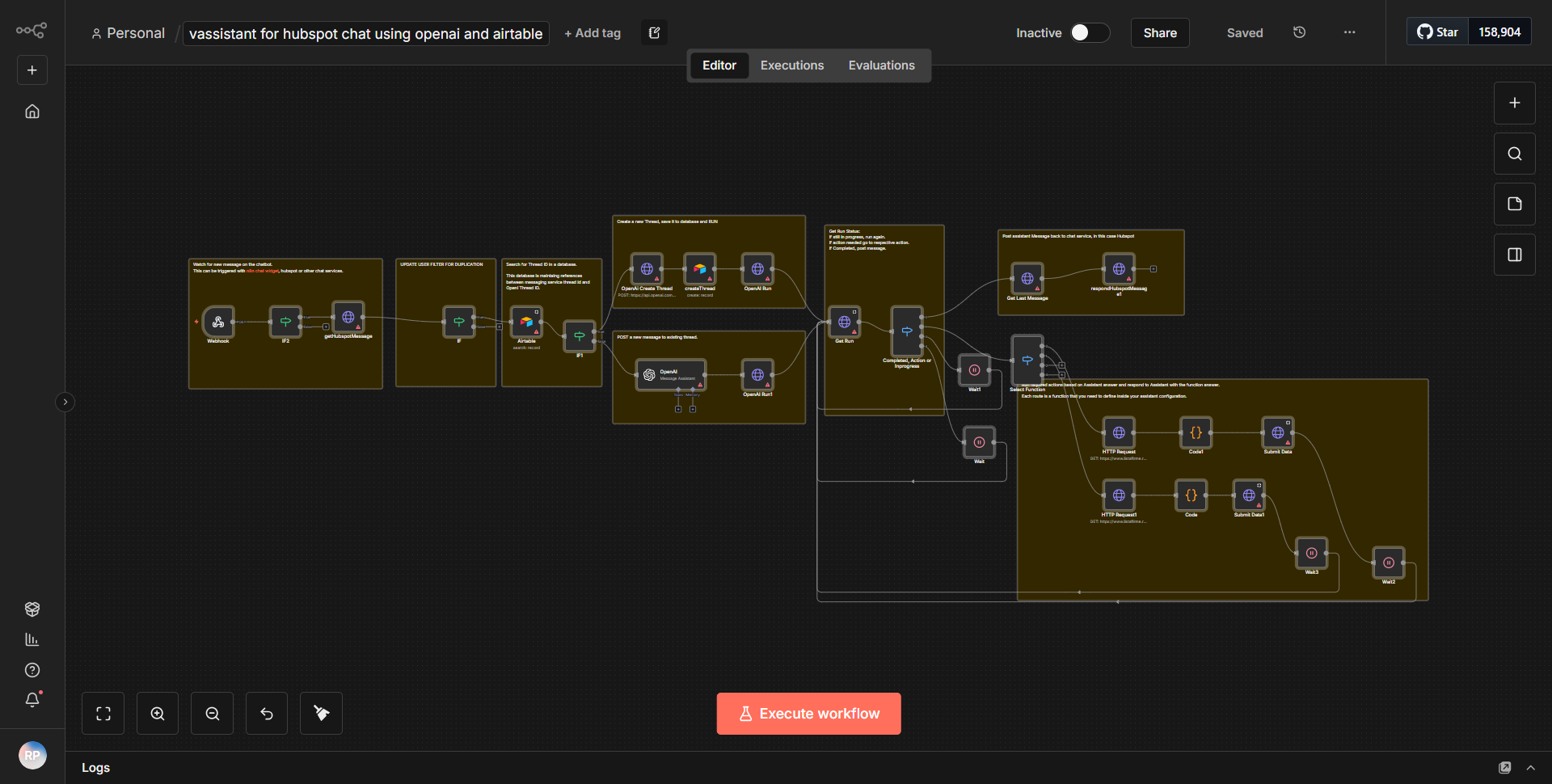
The workflow titled "vAssistant for HubSpot Chat utilizing OpenAI and Airtable" is designed to automate customer engagement through HubSpot Chat by leveraging OpenAI's capabilities and managing data in Airtable. The workflow operates in a sequential manner, starting with the retrieval of chat messages from HubSpot, processing these messages using OpenAI's language model, and finally storing relevant information in Airtable.
1. Trigger Node:
The workflow begins with a trigger node that listens for new chat messages in HubSpot. This node is configured to activate whenever a new message is received, capturing the content and metadata of the chat.
2. OpenAI Node:
Once a new chat message is detected, the workflow passes the message content to an OpenAI node. This node utilizes the OpenAI API to process the message and generate an appropriate response. The AI model interprets the context of the message and formulates a reply based on the input it receives.
3. Response Handling:
After generating a response, the workflow can include additional logic to determine whether the AI's reply should be sent back to the customer or if further actions are needed. This could involve checking for specific keywords or phrases that require different handling.
4. Airtable Node:
The final step involves saving pertinent information from the chat interaction into Airtable. This is accomplished through an Airtable node, which is configured to create or update records in a specified Airtable base. The data saved may include the original message, the AI-generated response, and any other relevant details that could assist in future customer interactions.
5. End of Workflow:
The workflow concludes after the data has been successfully stored in Airtable, ensuring that all interactions are logged for future reference and analysis.
Key Features
- Automated Customer Engagement:
The workflow automates responses to customer inquiries in HubSpot Chat, reducing the need for manual intervention and improving response times.
- AI-Powered Responses:
By utilizing OpenAI, the workflow can generate contextually relevant and intelligent replies, enhancing the customer experience.
- Data Management in Airtable:
The integration with Airtable allows for effective tracking and management of customer interactions, providing a centralized database for future reference.
- Real-Time Processing:
The workflow operates in real-time, ensuring that customer messages are processed and responded to without delay.
- Customizable Logic:
The workflow can be customized to include specific conditions for response handling, allowing businesses to tailor interactions based on customer needs.
Tools Integration
- HubSpot:
The workflow integrates with HubSpot to retrieve chat messages. The specific node used is the HubSpot node configured to listen for new messages.
- OpenAI:
The OpenAI node is utilized to process chat messages and generate responses based on the input received from customers.
- Airtable:
The Airtable node is employed to store relevant information from the chat interactions, allowing for organized data management and retrieval.
API Keys Required
- OpenAI API Key:
Required to authenticate and access the OpenAI API for generating responses.
- Airtable API Key:
Necessary for accessing and modifying records in the Airtable base where customer interactions are logged.
- HubSpot API Key:
Needed to connect and retrieve chat messages from the HubSpot platform.
No additional API keys or credentials are required beyond those mentioned above for the workflow to function properly.