Managing Job Application Entries Using AI and n8n Forms
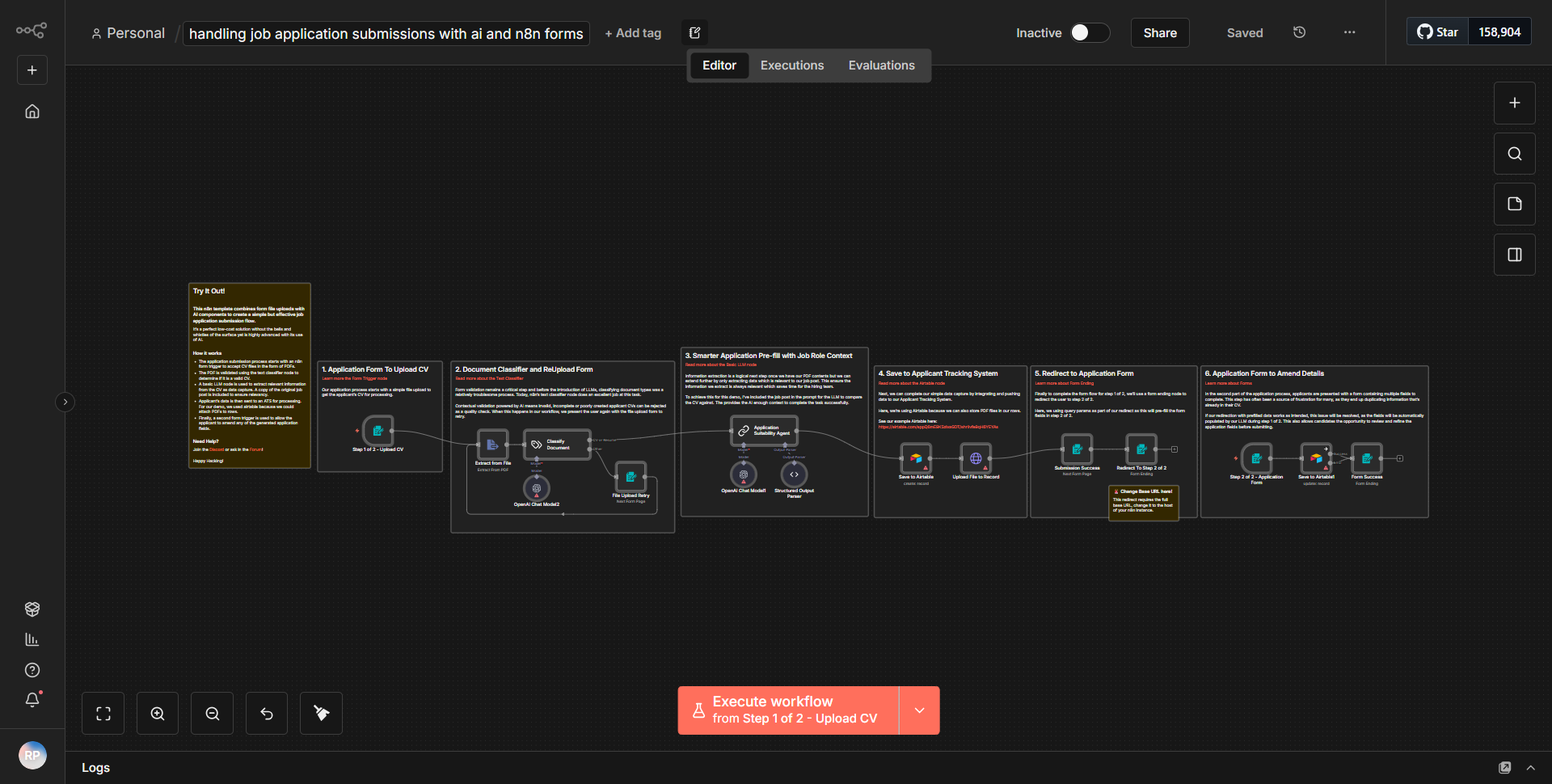
This workflow streamlines the processing of job applications by utilizing AI to extract data from resumes (PDF files), converting it into a structured format, and possibly saving it in Airtable.
How it works
This workflow is designed to streamline the processing of job applications by leveraging AI to extract data from resumes in PDF format. The workflow begins with an n8n Form node that collects job application submissions. When a new application is submitted, the workflow is triggered, and the data from the form is passed to the next node.
The first step involves the use of the "PDF Extract" node, which processes the uploaded PDF resume. This node extracts relevant text and data from the resume, converting it into a structured format that can be easily manipulated. The extracted data is then sent to an AI node, which analyzes the information and identifies key components such as the applicant's name, contact details, work experience, and education.
Following the AI analysis, the structured data is formatted appropriately for storage. The next node in the workflow is the "Airtable" node, which connects to an Airtable database. Here, the workflow saves the extracted and structured application data into a specified Airtable table. This integration allows for easy management and retrieval of job applications.
Finally, the workflow can include a notification step, which sends a confirmation email to the applicant, acknowledging the receipt of their application. This ensures that applicants are informed about the status of their submission, enhancing the overall user experience.
Key Features
1. Automated Data Extraction:
The workflow automates the extraction of data from resumes, significantly reducing manual effort and errors associated with data entry.
2. AI Integration:
By utilizing AI, the workflow intelligently analyzes and categorizes information from resumes, ensuring that key details are accurately captured.
3. Structured Data Storage:
The integration with Airtable allows for organized storage of applicant data, making it easy to manage and access applications.
4. User Notifications:
The workflow includes an automated notification system that keeps applicants informed about their application status, improving communication and engagement.
5. Scalability:
This workflow can handle multiple applications simultaneously, making it suitable for high-volume recruitment processes.
Tools Integration
- n8n Forms:
Used to collect job application submissions from applicants.
- PDF Extract Node:
Extracts text and data from uploaded PDF resumes.
- AI Node:
Analyzes the extracted data to identify and categorize key information.
- Airtable Node:
Integrates with Airtable to store structured application data.
- Email Node:
Sends confirmation emails to applicants upon successful submission of their application.
API Keys Required
• Airtable API Key: Required to authenticate and connect to the Airtable account for data storage.
• No additional API keys or authentication credentials are necessary for the other nodes used in this workflow.