WordPress Content Generation Automation Using DeepSeek R1
This workflow streamlines the process of generating content for WordPress by utilizing the DeepSeek R1 AI model, facilitating quick content production.
How it works
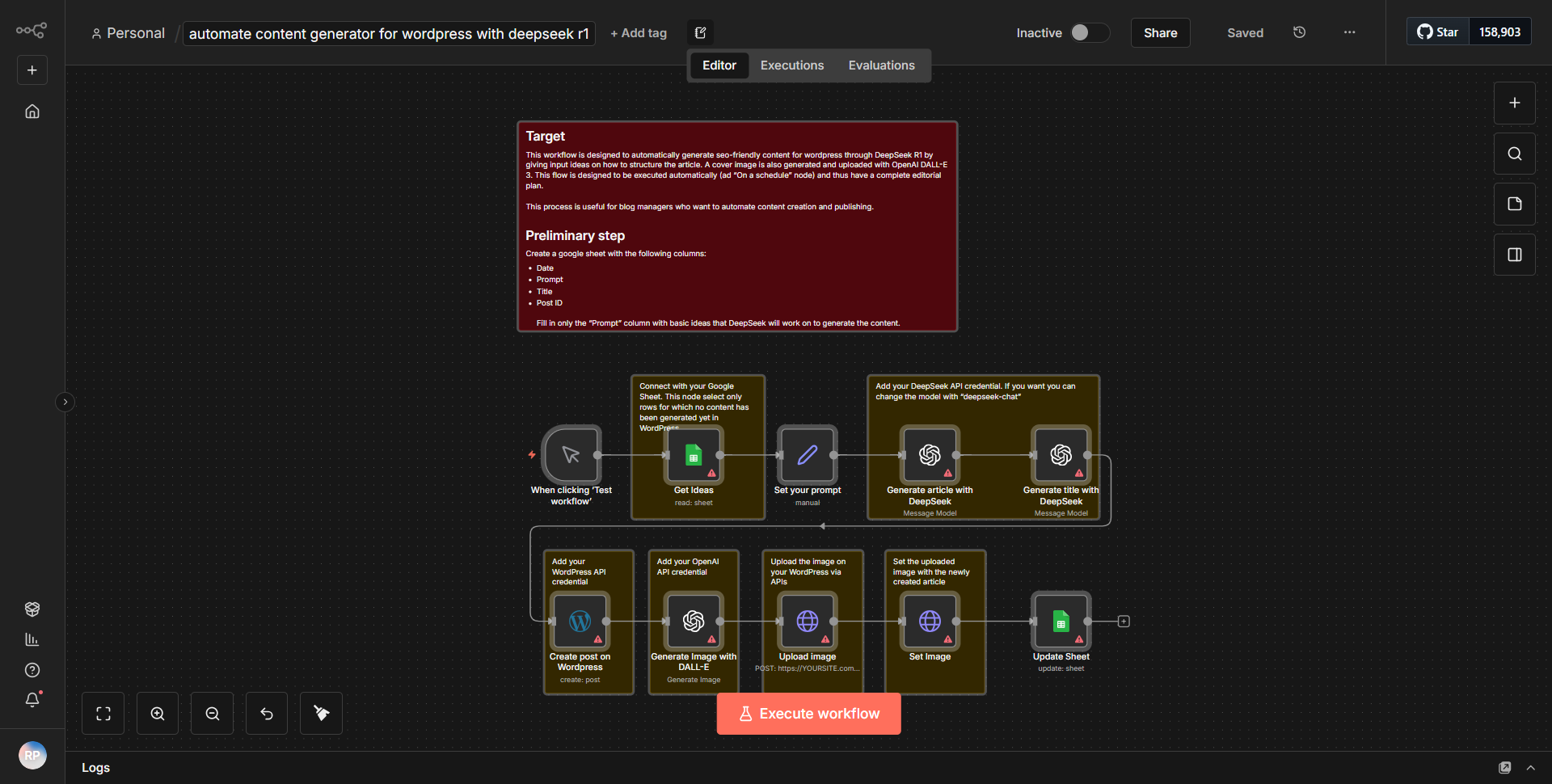
The workflow titled "WordPress Content Generation Automation Using DeepSeek R1" is designed to automate the process of generating content for a WordPress site using the DeepSeek R1 AI model. The workflow consists of several interconnected nodes that facilitate the flow of data from input to output.
1. Trigger Node:
The workflow begins with a trigger node that initiates the process. This could be a manual trigger or an event-based trigger, depending on how the user sets it up.
2. Input Node:
Following the trigger, there is an input node where the user can specify the parameters for the content generation. This could include topics, keywords, or other relevant information that the AI model will use to generate content.
3. DeepSeek R1 Node:
The core of the workflow is the DeepSeek R1 node, which takes the input parameters and sends a request to the AI model. The model processes the input and generates content based on the provided specifications.
4. Output Node:
Once the content is generated, it is passed to an output node that formats the content appropriately for WordPress. This may involve structuring the content into a post format, including titles, body text, and any necessary metadata.
5. WordPress Node:
Finally, the workflow includes a WordPress node that publishes the generated content directly to the specified WordPress site. This node handles authentication and ensures that the content is uploaded correctly.
Throughout the workflow, data flows seamlessly from one node to the next, with each node performing its designated function to ensure efficient content generation and publication.
Key Features
- Automated Content Generation:
The workflow automates the entire process of content creation, significantly reducing the time and effort required to produce new posts for a WordPress site.
- Integration with DeepSeek R1:
By leveraging the DeepSeek R1 AI model, the workflow can generate high-quality, relevant content tailored to the user's specifications.
- Direct Publishing to WordPress:
The workflow includes functionality to publish the generated content directly to a WordPress site, eliminating the need for manual uploads.
- Customizable Input Parameters:
Users can customize the input parameters to guide the content generation process, allowing for flexibility in the types of content produced.
- User-Friendly Interface:
The visual representation of the workflow in n8n makes it easy for users to understand and modify the automation process as needed.
Tools Integration
- DeepSeek R1:
The AI model used for content generation.
- WordPress:
The platform where the generated content is published.
- n8n Nodes:
Specific nodes used in the workflow include:
• Trigger Node
• Input Node
• DeepSeek R1 Node
• Output Node
• WordPress Node
API Keys Required
To successfully run this workflow, the following API keys and credentials are required:
- DeepSeek R1 API Key:
Necessary for authenticating requests to the DeepSeek R1 AI model.
- WordPress Credentials:
This includes the WordPress site URL, username, and application password or API key for authentication to publish content.
If no API keys are needed, it should be noted that the workflow can run without additional authentication configurations.