Inquire about a PDF utilizing AI
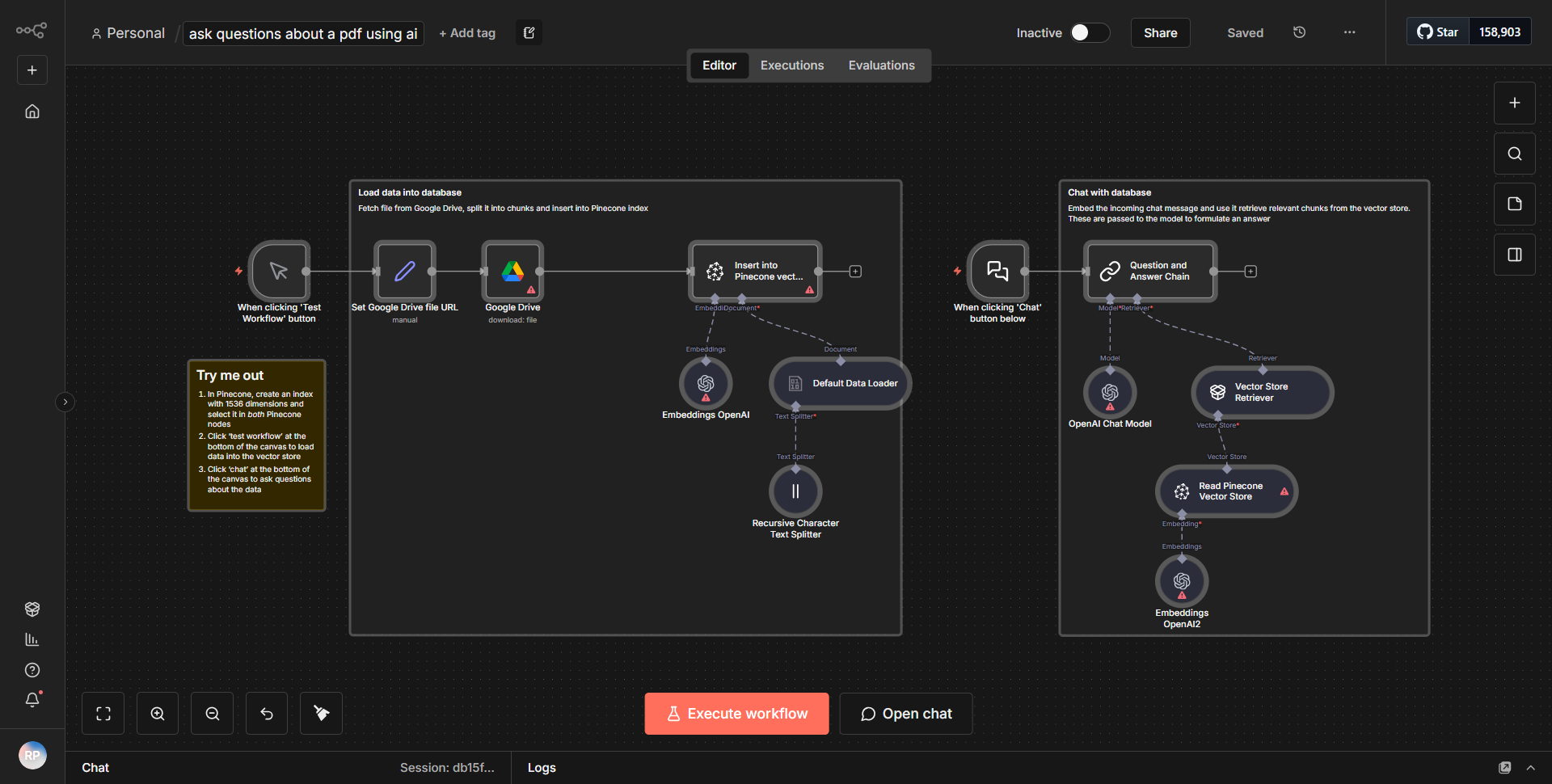
This workflow retrieves a PDF file from Google Drive, divides it into segments, processes the segments with OpenAI embeddings, and facilitates conversational interactions with the content of the document.
How it works
This workflow begins by retrieving a PDF file from Google Drive using the Google Drive node. The node is configured to search for a specific file based on its name or ID, ensuring that the correct document is accessed. Once the PDF is retrieved, the workflow proceeds to the "PDF Extract" node, which extracts the text content from the PDF file. This extracted text is then segmented into smaller parts to facilitate processing.
Following the extraction and segmentation, the workflow utilizes the OpenAI node to generate embeddings for each segment of text. This step is crucial as it transforms the textual data into a format that can be understood and processed by AI algorithms. The embeddings allow for more efficient querying and interaction with the content of the document.
After the embeddings are created, the workflow incorporates a conversational interface, enabling users to ask questions about the content of the PDF. This is achieved through a series of nodes that handle user input, process the queries, and return relevant responses based on the embeddings generated earlier. The workflow effectively creates a loop where user inquiries can be continuously processed, allowing for an interactive experience with the PDF content.
Key Features
1. PDF Retrieval:
The workflow seamlessly integrates with Google Drive to fetch PDF documents, making it easy to access files stored in the cloud.
2. Text Extraction:
It employs a dedicated node to extract text from PDF files, ensuring that all relevant information is available for processing.
3. Content Segmentation:
The extracted text is divided into manageable segments, which enhances the efficiency of the AI processing and allows for more precise responses to user queries.
4. AI Embeddings:
By utilizing OpenAI embeddings, the workflow transforms text into a vector format, enabling advanced AI capabilities for understanding and responding to user inquiries.
5. Conversational Interface:
The workflow supports a dynamic question-and-answer format, allowing users to interactively engage with the content of the PDF, making it a powerful tool for information retrieval and learning.
Tools Integration
- Google Drive:
Used to retrieve the PDF file. The Google Drive node is configured to access specific files based on user-defined parameters.
- PDF Extract:
This node is responsible for extracting text from the PDF document, ensuring that the content is available for further processing.
- OpenAI:
The OpenAI node is utilized to generate embeddings from the extracted text segments, enabling sophisticated AI interactions.
- Webhook:
This node allows for the reception of user queries, facilitating the conversational aspect of the workflow.
API Keys Required
To operate this workflow, the following API keys and credentials are necessary:
- Google Drive API Key:
Required for authenticating and accessing files stored in Google Drive.
- OpenAI API Key:
Needed to utilize the OpenAI services for generating embeddings and processing user queries.
No additional API keys or authentication credentials are required beyond those mentioned above.