imgproxy
Self-managed solution for image processing requirements.
On
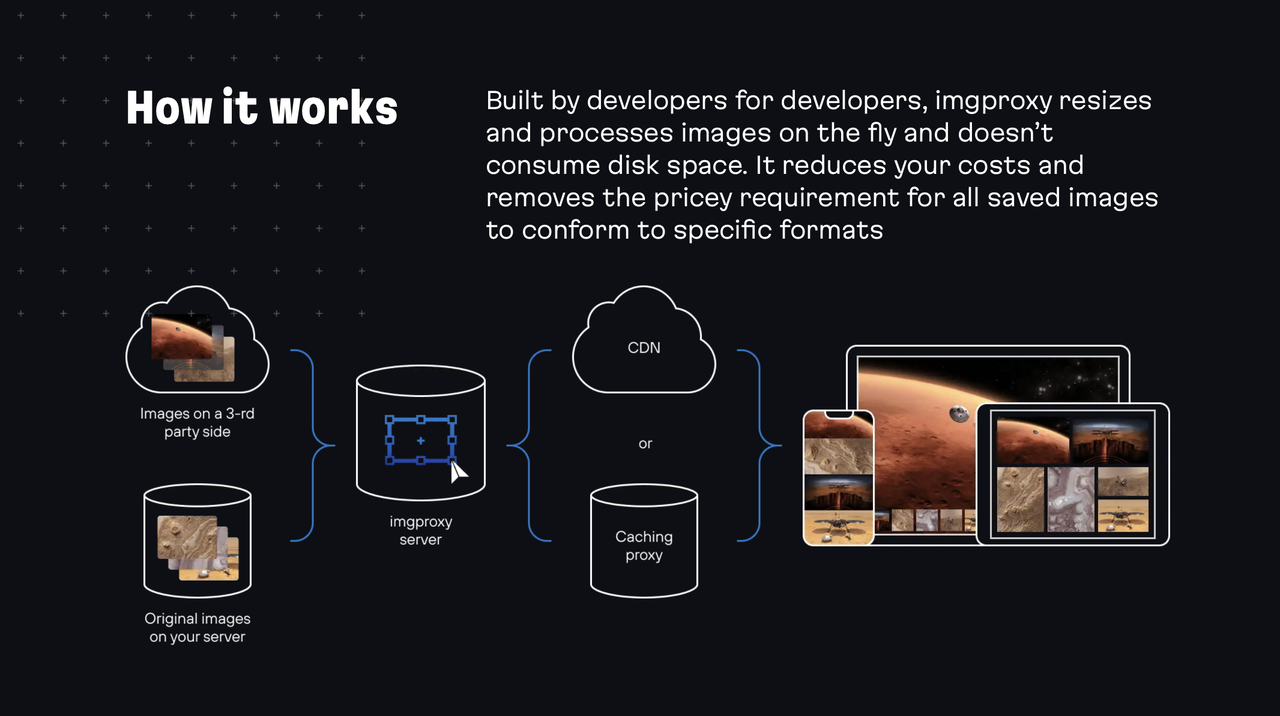
imgproxy is an open-source image processing server designed to optimize and deliver images efficiently. It offers self-hosted solutions that are both cost-effective and scalable, making it an appealing alternative to traditional SaaS offerings. With a straightforward setup process and user-friendly management tools, imgproxy allows developers to seamlessly integrate image processing into their applications. The server supports various image transformations such as resizing, cropping, and format conversion, ensuring that images are tailored to meet specific requirements while maintaining high quality. In addition to its core functionalities, imgproxy emphasizes security and performance. The server provides secure image handling with features like signed URLs, ensuring that access to images is controlled and protected. Furthermore, imgproxy is built to handle large volumes of image requests efficiently, making it suitable for high-traffic applications. The Pro edition extends its capabilities, offering advanced features that cater to more complex image processing needs. Overall, imgproxy stands out as a reliable, high-performance tool for developers looking to enhance their image delivery workflows.
Tool Benefits
imgproxy delivers fast and efficient image processing, allowing for real-time image transformations without sacrificing performance.
The tool is highly scalable, making it suitable for applications of any size, from small projects to large-scale enterprise systems.
imgproxy supports a wide variety of image formats and provides numerous resizing and optimization options, ensuring flexibility in handling diverse image requirements.
It features a simple API, enabling developers to easily integrate image processing capabilities into their applications.
The tool is open-source, allowing users to customize and extend its functionalities according to specific project needs.