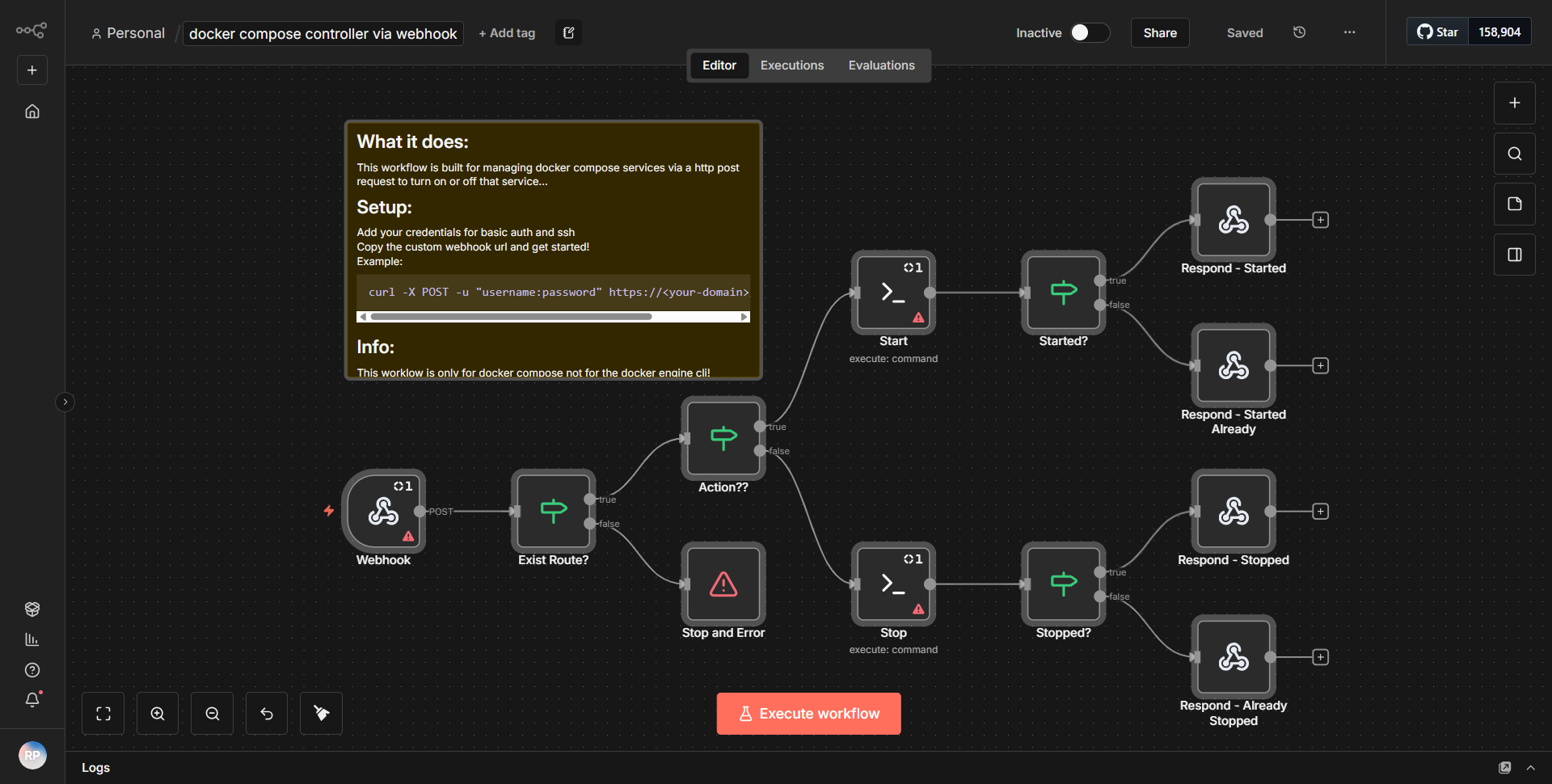
Webhook-Based Docker Compose Controller
Initiate or terminate Docker Compose services on your server through a secure HTTP POST request using n8n and SSH.
How it works
The workflow titled "Webhook-Based Docker Compose Controller" is designed to manage Docker Compose services on a server through secure HTTP POST requests. The workflow begins with a
Webhook
node, which listens for incoming HTTP POST requests. When a request is received, it captures the data sent in the request body, which typically includes parameters indicating whether to start or stop a specific Docker service.Following the Webhook node, the workflow utilizes a
Set
node to structure the incoming data. This node extracts relevant information from the webhook request, such as the action (start or stop) and the service name. The output of the Set node is then passed to aFunction
node, which contains custom JavaScript code that determines the appropriate command to execute based on the action specified in the request.Next, the workflow includes an
SSH
node, which is configured to connect to the server where the Docker Compose services are hosted. This node executes the command generated by the Function node. Depending on the action received, the SSH node will either start or stop the specified Docker service using the appropriate Docker Compose command.Finally, the workflow concludes with a
Respond to Webhook
node, which sends a response back to the client that initiated the request. This response confirms whether the requested action was successfully executed or if there were any errors.Key Features
1. Webhook Trigger:
The workflow starts with a Webhook node, allowing it to be triggered by external HTTP POST requests, making it suitable for integration with various applications and services.
2. Dynamic Command Execution:
The use of a Function node allows for dynamic command generation based on the input parameters, enabling flexible management of Docker services.
3. SSH Integration:
The SSH node facilitates secure remote execution of commands on the server, ensuring that Docker services can be managed without exposing the server directly to the internet.
4. Service Management:
The workflow can start or stop any Docker Compose service, providing a simple interface for service control through web requests.
5. Response Handling:
The workflow includes a mechanism to respond to the webhook request, providing feedback on the success or failure of the executed command, which is essential for debugging and user experience.
Tools Integration
- n8n Webhook Node:
Captures incoming HTTP POST requests.
- n8n Set Node:
Structures and extracts data from the incoming request.
- n8n Function Node:
Executes custom JavaScript code to determine the command based on the request.
- n8n SSH Node:
Connects to a remote server to execute Docker Compose commands.
- n8n Respond to Webhook Node:
Sends a response back to the requester.
API Keys Required
No API keys or authentication credentials are required for this workflow to function. However, SSH access to the server where Docker Compose is running is necessary, which may involve setting up SSH keys or credentials for secure connection.